(USF) Plan Careers
The Plan Careers business process for U.S. Federal Government users enables you to set up career plans and produce Individual Development Plans (IDPs) for employees' career development paths. You can track IDP progress, job move costs, training, employee appraisals, mentoring, and self-implemented career development activities. An employee or supervisor can request to work on a career plan at any time.
Once you create a career plan, the system:
-
Routes the plan along the agency's path of review and approval.
-
Tracks costs and activities associated with the plan.
-
Generates the IDP output form.
Use career plans to complement performance reviews and training programs or to prepare employees to become key managers. Career plans help you develop backup personnel for open positions.
Note:
Using the Plan Careers business process is optional, and is intended to work with merit staffing practices as established by law, regulation, or internal policy.
Career Plan Tracking
The Plan Careers business process includes a sequence of steps that enable you to track the request, approval, and completion of career plans. For example, a path might include:
-
Creating a career plan.
-
Submitting it as a request.
-
Giving reviews and approvals.
-
Completing an authorized career plan.
-
Producing an IDP.
PeopleSoft workflow manages routing and tracking. You assign a status, and workflow tracks and routes the career plan through the approval cycle. Reviewers change the status to either continue the review process or disapprove the plan. The system then shows the career plan status on the Career Plan page.
Career Plan Approval Process
This graphic presents an overview of the career plan approval process:
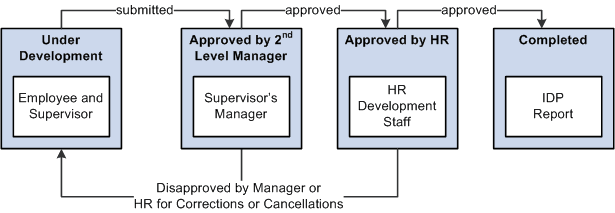
The following definitions describe the process of submitting and reviewing career plans. You can use these or adapt them to meet specific requirements.
| Status | Career Plan Status Code | Definition |
|---|---|---|
|
Under Development |
1 |
Employee and supervisor create a career plan, assign this status, and work on the plan until submitting it to the second-level supervisor or manager. |
|
Submitted to Supervisor |
2 |
Supervisor assigns this status to send the career plan to the second-level supervisor or manager. |
|
Approved by Manager |
3 |
Manager or second-level supervisor assigns this status to send the plan to the human resources department. |
|
Disapproved by Manager |
4 |
Manager or second-level supervisor assigns this status to send career plan back to originators for cancellation. |
|
Approved by HR |
5 |
Human resources official approves request by assigning this status. |
|
Disapproved by HR |
6 |
Human resources official disapproves request by assigning this status. |