Setting Up DETYA Reporting Codes
To set up DETYA reporting, use the Classification Codes AUS (DETYA_CURR_CLS) and Organization Unit AUS (DETYA_ORG_UNT) components. This topic discusses how to maintain classification codes and organizational units.
For the purposes of DETYA reporting, you must complete two tables to define employee classifications and organizational units.
Pages Used to Set Up DETYA Reporting Codes
| Page Name | Definition Name | Usage |
|---|---|---|
|
DETYA_CLSN_AUS |
Define classification codes specific to DETYA reporting. |
|
|
DETYA_ORGUNIT_AUS |
Define organizational units specific to DETYA reporting. |
Classification Codes AUS Page
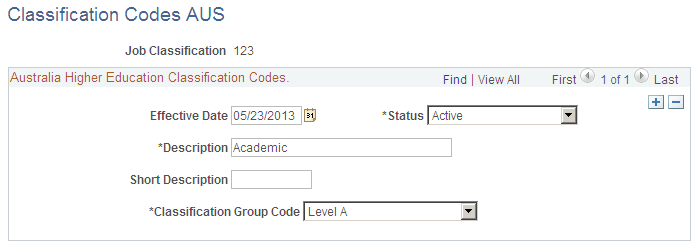
Use the Classification Codes AUS page (DETYA_CLSN_AUS) to define classification codes specific to DETYA reporting.
Navigation:
This example illustrates the fields and controls on the Classification Codes AUS page.
| Field or Control | Description |
|---|---|
|
Classification Group Code |
Select the appropriate classification group corresponding to the code being defined. The group code defines the level of work being performed. DETYA defines these groups and the corresponding codes. Options are Abv Sr Lec (above senior lecturer), Level A, Level B, Level C and Non Acad (non academic). |
Organization Unit AUS Page
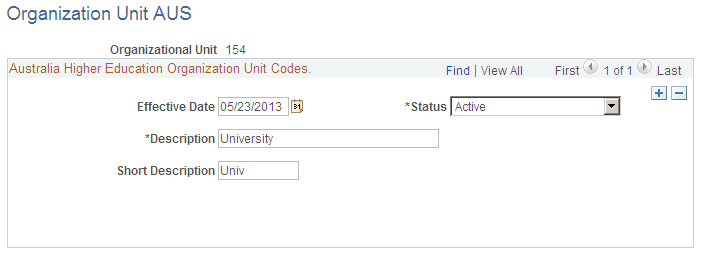
Use the Organization Unit AUS page (DETYA_ORGUNIT_AUS) to define organizational units specific to DETYA reporting.
Navigation:
This example illustrates the fields and controls on the Organization Unit AUS page.
| Field or Control | Description |
|---|---|
|
Effective Date, Description and Short Description |
Define the information for each organizational unit. |