Deduction Override Evaluation Hierarchy
To determine deduction overrides, the Create Paysheet and Pay Calculation processes use a deduction override evaluation process, which reads values entered in the General Deductions Taken, General Ded Subset ID, Benefit Deductions Taken, and Benefit Ded Subset ID fields on a succession of pages.
This diagram illustrates the deduction override evaluation process:
This diagram illustrates the deduction override evaluation process.
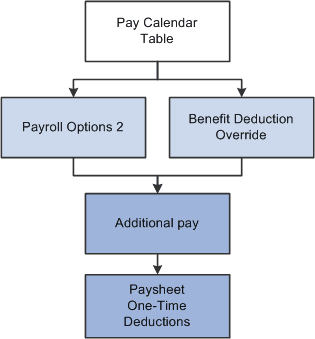
The following list presents the order of deduction override evaluation. The value listed on each successive page overrides the value on the previous pages in this list:
-
Pay Calendar Table page: general and benefits deductions at the pay calendar level.
-
Payroll Options 2 page: general deductions at the employee level.
-
Override Benefits Deductions page: benefit deductions at the employee level.
-
Create Additional Pay component (ADDITIONAL_PAY): general and benefit deductions at the employee level for a separate check only.
-
One-Time Deductions page: general and benefit deduction manual overrides on the paysheet at the employee level.
Note:
For off-cycle runs, select the Off-Cycle Ded Override (off-cycle deduction override) check box on the Pay Calendar Table page to enable the deduction taken fields on the Pay Calendar to be overridden by employee level overrides.