General Processing Information
This topic discusses:
-
Pay information processed.
-
Calculation processing description.
-
Calculation processing options.
Pay Information Processed
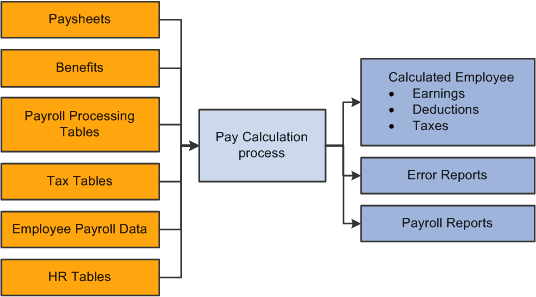
Pay calculation processes information that you set up in PeopleSoft HCM and Payroll for North America setup tables and employee setup tables, as well as additional information that is provided on paysheets.
This diagram shows what payroll and HCM information is used in the pay calculation process:
This diagram shows what payroll and HCM information is used in the pay calculation process.
Calculation Processing Description
During the pay calculation, the system determines earnings, deductions, taxes, and net pay for all employees with pay earnings in a payline marked OK to Pay.
The system processes one company at a time, and within each company, every pay group that is assigned to that pay run ID. As it processes each pay group, the system indicates the number of checks to be calculated and how many have already been calculated.
The system commits the calculations after processing the number of employees that are specified in the Installation table. In other words, it updates the physical database with the results of the calculations.
Note:
Any online change to an employee's pay data that deletes rows or alters an OK to PAY check box may not be reflected in an updated paysheet. In these cases, you must verify that the paysheet reflects the desired change and, if it does not, change the paysheet directly.
Off-Cycle Processing
Off-cycle payroll processing refers to calculating and creating a paycheck for one or more employees outside the normally scheduled (on-cycle) payroll run for their pay group. You typically use off-cycle payroll processing to create checks for the following employees:
-
Employees who are being terminated.
-
New hires that were not entered into the system in time for the last on-cycle payroll run.
-
Employees who received an incorrect payroll check during a normal payroll.
The steps for processing an off-cycle payroll are similar to the steps for processing a normal on-cycle payroll. Specify off-cycle processing run parameters.
Calculation Processing Options
To make the pay calculation as efficient as possible, the system contains safeguards and options. For example, you can specify whether to:
-
Calculate pay in preliminary or final mode.
-
Calculate for all employees, or only for employees with changes to their payroll data.
-
Transfer calculation errors if you use the Continue with Errors feature.
See Continue with Errors.
You can select any combination of options, and you can run payroll calculation as many times as you need in any mode. The only restriction is that before transferring errors, you must recalculate for all employees to ensure that untransferrable errors are corrected.
WARNING:
You must correct all pay calculation errors that are not included in the Continue With Errors definition before beginning the pay confirmation.
Related Topics