Generating a Balance Adjustment Report
Pages Used to Generate the Balance Adjustment Report
| Page Name | Definition Name | Usage |
|---|---|---|
|
RUNCTL_PAY025 |
(USA, USF) Generate the PAY025 report, which details the information recorded with each balance adjustment processed through the balance adjustment pages. |
|
|
RUNCTL_PAY025CN |
(CAN) Generate the PAY025CN report, which details the information recorded with each balance adjustment processed through the balance adjustment pages. |
Balance Adjustment Report Page
(USA, USF) Use the Balance Adjustment Report page (RUNCTL_PAY025) to generate the PAY025 report, which details the information recorded with each balance adjustment processed through the balance adjustment pages.
(CAN) Use the Balance Adjustment Report page (RUNCTL_PAY025CN) to generate the PAY025CN report, which details the information recorded with each balance adjustment processed through the balance adjustment pages.
Navigation:
This example illustrates the fields and controls on the Balance Adjustment Report page.
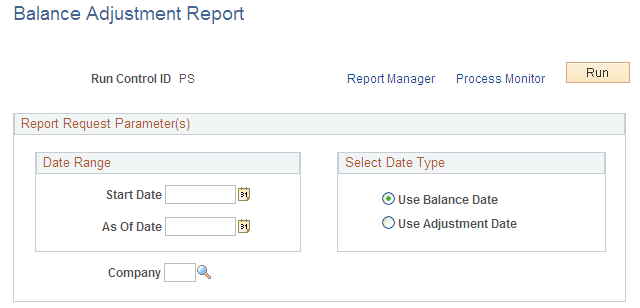
| Field or Control | Description |
|---|---|
|
Select Date Type |
Selecting Use Balance Date reports balance records for periods in the specified date range to which you've applied adjustments. Selecting Use Adjustment Date reports all balance records that you adjusted on dates in the specified date range. |