Pay Confirmation in the Payroll Process
After you verify that the payroll calculation is correct and you run the Pay Calculation COBOL SQL process (PSPPYRUN) in final mode, you can run the Pay Confirmation process. Pay confirmation is the final step in running your payroll. Running the Pay Confirmation process indicates that you've reviewed and approved all payroll information for this pay run, and that you're ready to produce paychecks.
After a payroll has been confirmed, you can generate checks, advices, and any other payroll reports. You can also generate the direct deposit, general ledger, or any other interface. You can review an employee's check totals and payroll balances online.
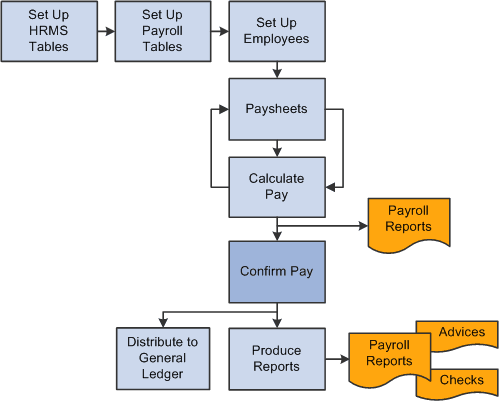
This diagram illustrates where pay confirmation fits into the payroll process, from setting up PeopleSoft HR tables to producing payroll reports, advices and checks:
This diagram illustrates where pay confirmation fits into the payroll process, from setting up PeopleSoft HR tables to producing payroll reports, advices and checks.
WARNING:
Do not run the Pay Confirmation process unless you are confident that the amounts have been calculated properly. After the Pay Confirmation process is complete, you cannot update paysheet information unless you first run the Pay Unconfirm COBOL SQL process (PSPUNCNF).