Reviewing and Adjusting Deduction Balances
Pages Used to Review and Adjust Deduction Balances
| Page Name | Definition Name | Usage |
|---|---|---|
|
Deduction Balances Page |
BALANCES_DED1 |
(USA, USF) Review an employee's deduction balances. |
|
Deduction Balances Page |
BALANCES_CN_DED1 |
(CAN) Review an employee's deduction balances. |
|
Deduction Balance Adjustments Page |
BALANCES_DED2 |
(USA, USF) Review online adjustments to an employee's deduction balances. |
|
Deduction Balance Adjustments Page |
BALANCES_CN_DED2 |
(CAN) Review online adjustments to an employee's deduction balances. |
|
Adjust Deduction Balance 1 Page |
ADJ_DED_BAL1 |
(USA, USF) Identify the deduction for which you're adjusting balances. |
|
Adjust Deduction Balance 1 Page |
ADJ_CN_DED_BAL1 |
(CAN) Identify which deduction balances you want to adjust. |
|
ADJ_DED_BAL2 |
(USA, USF) Change deduction balances. |
|
|
Adjust Deduction Balance 2 Page |
ADJ_CN_DED_BAL2 |
(CAN) Change deduction balances. Note: The (CAN) Adjust Deduction Balance 2 page is the same as the (USA, USF) Adjust Deduction Balance 2 Page. |
Adjust Deduction Balance 2 Page
(USA, USF) Use the Adjust Deduction Balance 2 page (ADJ_DED_BAL2) to change deduction balances.
(CAN) Use the Adjust Deduction Balance 2 page (ADJ_CN_DED_BAL2) to change deduction balances.
Navigation:
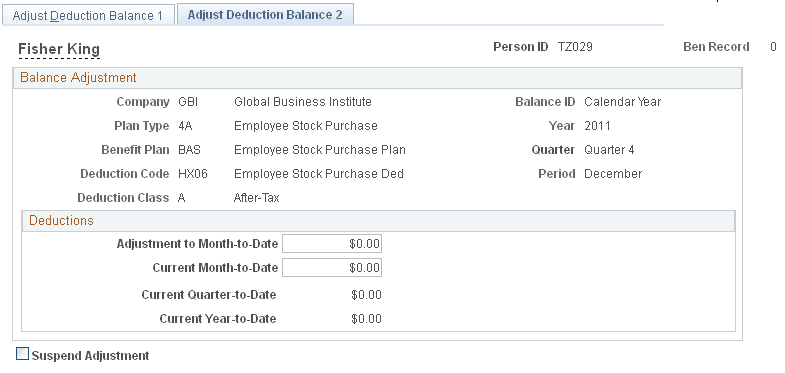
This example illustrates the fields and controls on the Adjust Deduction Balance 2 page.
Note:
To access this page you must first enter identifying criteria on the Adjust Deduction Balance 1 page and save it.
| Field or Control | Description |
|---|---|
|
Adjustment to Month-to-Date |
If you enter an adjustment, the system calculates the new current month-to-date. |
|
Current Month-to-Date |
If you enter a new current month-to-date balance, the system calculates the adjustment to month-to-date. |