Reviewing and Adjusting Garnishment Balances
Pages Used to Review and Adjust Garnishment Balances
| Page Name | Definition Name | Usage |
|---|---|---|
|
BALANCES_GRN1 |
Review the garnishments that you have taken if you are garnishing an employee's wages. |
|
|
Garn Balance Adjustment Page |
BALANCES_GRN2 |
Review online adjustments to garnishment balances. |
|
Adjust Garnishment Balance 1 Page |
ADJ_GRN_BAL1 |
Specify which garnishment balances you're adjusting. |
|
ADJ_GRN_BAL2 |
Change garnishment balances. |
Garnishment Balances Page
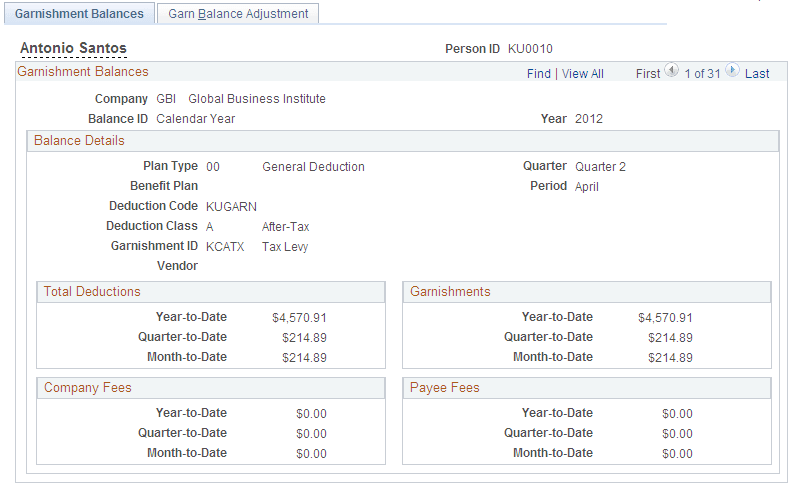
Use the Garnishment Balances page (BALANCES_GRN1) to review the garnishments that you have taken if you are garnishing an employee's wages.
Navigation:
This example illustrates the fields and controls on the Garnishment Balances page.
| Field or Control | Description |
|---|---|
|
Garnishments |
System-calculated limit processing results appear in this group box. If you have adjusted the garnishment balances, enter that value in the Limit Balance field on the Garnishment Spec Data 3 page . The Limit Amount and Limit Balance amounts on the Garnishment Spec Data 3 page may not correspond to the Quarter-to-Date or Month-to-Date garnishment balances that appear here if an employee has not satisfied the garnishment amount during the calendar year. For example, assume the employee has a garnishment limit amount set up for $1,000 in the current year. During the year, the employee has $700 deducted for the garnishment The Limit Amount and Limit Balance field values are not re-set when the new year begins. The employee satisfies the garnishment in the new year, so the Year-to-Date garnishment amount is $500.00, which does not match the Limit Amount and Limit Balance on the Garnishment Spec Data 3 page. |
Adjust Garnishment Balance 2 Page
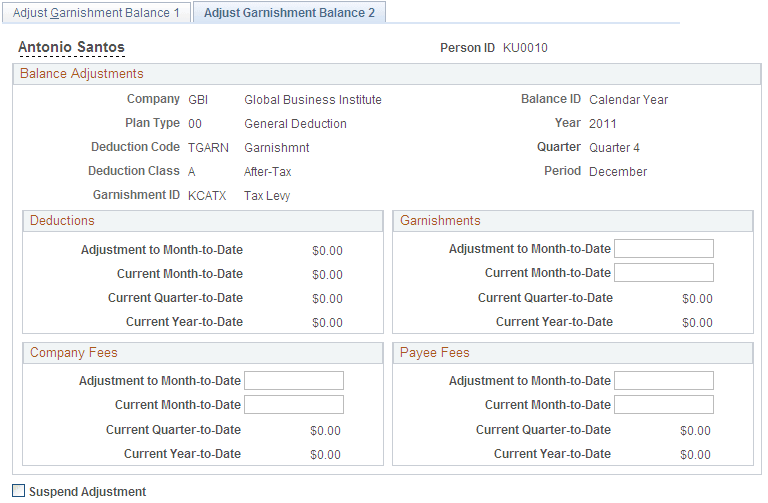
Use the Adjust Garnishment Balance 2 page (ADJ_GRN_BAL2) to change garnishment balances.
Navigation:
This example illustrates the fields and controls on the Adjust Garnishment Balance 2 page.
Note:
To access this page you must first enter identifying criteria on the Adjust Garnishment Balance 1 page and save it.
| Field or Control | Description |
|---|---|
|
Deductions, Garnishments, Company Fees, and Payee Fees |
If you enter a new current month-to-date balance, the system calculates the adjustment to month-to-date; if you enter an adjustment to month-to-date, the system calculates the new current month-to-date. |