Setting Up BPS Reporting Tables
To set up BPS reporting tables, use the Business Information (BPS_CONTACT) and Activity Table (BPS_ACT_TBL) components.
Pages Used to Set Up BPS Reporting
| Page Name | Definition Name | Usage |
|---|---|---|
|
BPS Business Information Page (Business Payrolls Survey business information) |
BPS_CONTACT_CAN |
(CAN) Enter the business and contact information for Record Type 1 of the survey's EDR file. |
|
BPS Activity Table (Business Payrolls Survey activity table) |
BPS_ACT_TBL |
(CAN) Create the business activities (defined by Statistics Canada) to set up the reporting units in the BPS Reporting Unit table. |
BPS Business Information Page
(CAN) Use the BPS Business Information (Business Payrolls Survey business information) page (BPS_CONTACT_CAN) to enter the business and contact information for Record Type 1 of the survey's EDR file.
Navigation:
This example illustrates the fields and controls on the BPS Business Information page.
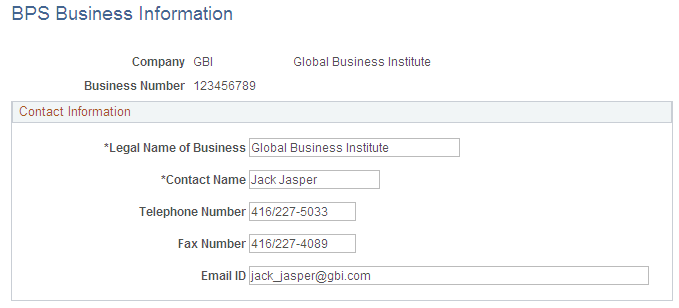
| Field or Control | Description |
|---|---|
|
Business Number |
The system automatically retrieves this payroll account number from the company's Wage Loss Plan record. This field is display-only. |
|
Contact Name |
Enter the name of your company's BPS contact person as it should appear in the transmission file. |
BPS Activity Table
(CAN) Use the BPS Activity Table (Business Payrolls Survey activity table) page (BPS_ACT_TBL) to create the business activities (defined by Statistics Canada) to set up the reporting units in the BPS Reporting Unit table.
Navigation:
Note:
Use the Job Code Profile page to link BPS activities to job codes. When defining initial BPS activity codes on the Job Code Table component (JOB_CODE_TBL), apply updates to all relevant current, history, and future-dated records for the reference months required for reporting.
Related Topics