Specifying Employee-Level Benefit Deduction Overrides
Page Used to Specify Employee-Level Benefit Deduction Overrides
| Page Name | Definition Name | Usage |
|---|---|---|
|
DED_SUBSET_BENF |
Specify overrides to benefit deductions at the employee level. |
Understanding Benefit Deduction Overrides
Benefit deduction processing override applies to benefit deductions only and overrides the benefit deductions taken value on the Pay Calendar table at the employee level. Multiple job employees can have multiple benefit records and each benefit record can have its own deduction override set up. These are reflected on separate paylines.
Override Benefits Deductions Page
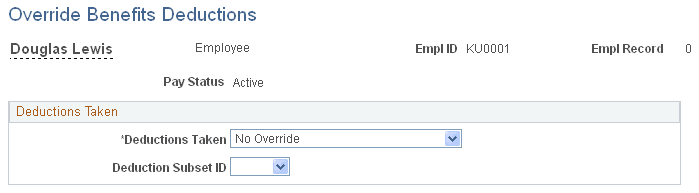
Use the Override Benefits Deductions page (DED_SUBSET_BENF) to specify overrides to benefit deductions at the employee level.
Navigation:
This example illustrates the fields and controls on the Override Benefits Deductions page.
| Field or Control | Description |
|---|---|
|
Deductions Taken |
Select a value to indicate how to take benefit deductions for this employee. The default value is No Override. Selections made on this page override the values that are entered for the pay run in the Benefit Deductions Taken field on the Pay Calendar table:
|
| Field or Control | Description |
|---|---|
|
Deduction Subset ID |
You must specify the subset ID if you select Deduction Table Subset Governs in the Deductions Taken field. |