Calculate Deductions Process Flow
This diagram illustrates the Calculate Deductions process flow:
This diagram illustrates the Calculate Deductions process flow.
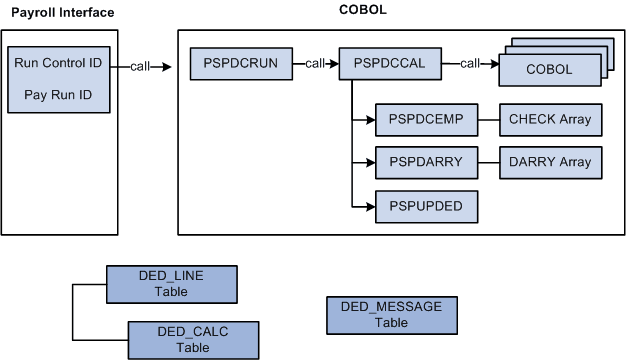
Deduction processing occurs in the following way:
-
To start the Calculate Deductions process, enter a pay run ID and other parameters using the Calculate Deductions (RUNCTL_DED_CALC) component, Calculate Deductions page.
-
PSPDCRUN reads the pay run ID and calls PSPDCCAL.
-
PSPDCCAL calls the COBOL routines required to process deductions.
-
PSPDCCAL calls PSPDCEMP, which in turn creates the CHECK array.
-
PSPDCCAL calls PSPDARRY, which in turn creates the DARRY array.
-
PSPDCCAL calls PSPUPDED, which populates the DED_LINE and DED_CALC tables.
PSPDCCAL calls PSPDCEMP
The PSPDCEMP COBOL routine:
-
Selects the jobs and benefit programs to be processed by PSPDARRY.
-
Stores the EMPL_RCD and BEN_RCD that might exist for the EMPLID in the CHECK array.
PSPDCCAL calls PSPDARRY
The PSPDARRY COBOL routine:
-
Uses the CHECK array to select and calculate the deduction values that should be taken from an employee's check.
-
Stores the calculated deduction values in the DARRY array.
PSPDCCAL calls PSPUPDED
The PSPUPDED COBOL routine writes the results of the Calculate Deductions process to the DED_LINE and DED_CALC tables.
Note:
The EMPLID/EMPL_RCD key field combinations for an employee are determined using the CHECK and DARRY arrays.