DED_LINE and DED_CALC Tables
Payroll Interface stores the results of the Calculate Deductions and Deduction Confirmation processes in three tables: DED_CALC, DED_LINE, and DED_MESSAGE.
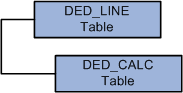
This diagram illustrates the parent-child relationship between the DED_LINE and DED_CALC tables:
This diagram illustrates the parent-child relationship between the DED_LINE and DED_CALC tables.
DED_LINE Table
The DED_LINE table stores the EMPLID and EMPL_RCD key fields that are required to identify and process an employee. The value of the PAY_LINE_STATUS field indicates whether the process finished successfully or failed. You can view the results using the Review Deductions (DED_CALCULATIONS) component.
Possible PAY_LINE_STATUS values are:
-
Calculated (C): Deductions were calculated; no errors occurred
-
Confirmed (F): Deductions were confirmed; no errors occurred.
-
Error (E): An error occurred.
-
Updated by user (U): An error occurred.
-
Pay in progress (P): An error occurred.
DED_CALC Table
The DED_CALC table stores the EMPLID and EMPL_RCD key fields that are required to identify an employee as well as the results of the Calculate Deductions process, including the deduction codes and amounts for each. You can view results using the Review Deductions component.
DED_MESSAGE Table
The DED_MESSAGE table stores the EMPLID and EMPL_RCD key fields that are required to identify an employee and is populated only if an error occurs during the Calculate Deductions or Deduction Confirmation process. You can view the error messages using the Review Error Messages (DED_MESSAGE) component.