Cloning an Interface Definition
Pages Used to Clone an Interface Definition
| Page Name | Definition Name | Usage |
|---|---|---|
|
PI_RUNCTL_SID_PNL |
Select the cloning options and run the P.I. Cloning Utility Application Engine process (PI_CLONE) to copy an interface definition. |
Clone Payroll Interface Page
Use the Clone Payroll Interface page (PI_RUNCTL_SID_PNL) to select the cloning options and run the PI. Cloning Utility Application Engine process (PI_CLONE) to copy an interface definition.
Navigation:
This example illustrates the fields and controls on the Clone Payroll Interface page.
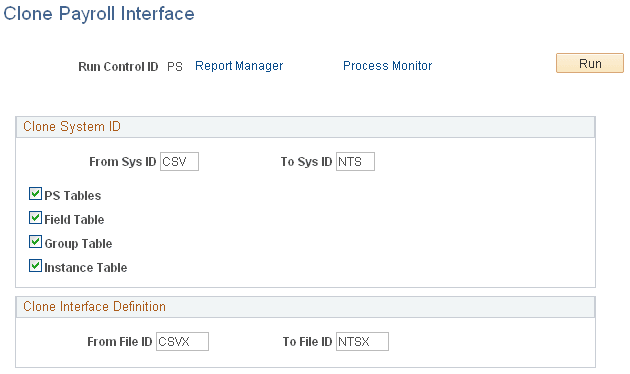
Clone System ID
Use the System ID Cloning Utility to copy the PS Tables, Field Table, Group Table, and Instance Table components and system IDs.
| Field or Control | Description |
|---|---|
|
Clone from Sys ID (clone from system ID) |
Select the system ID of the interface definition that you want to copy (the existing interface definition). |
|
Clone to Sys ID (clone to system ID) |
Select the system ID of the interface definition that you want to create (the new interface definition). Note: You must set up the system ID using the System Table component before you can enter it here. |
|
PS Tables, Field Table, Group Table, and Instance Table |
Select the components that you want to copy. |
Clone Interface Definition
Use the Interface Definition Cloning Utility to copy the Definition Table component and file IDs.
| Field or Control | Description |
|---|---|
|
Clone from File ID |
Select the file ID of the export or import file that you want to copy. |
|
Clone to File ID |
Select the file ID of the export or import file that you want to create. |
Note:
If you are copying more than one file ID (for example, the CSV sample data set includes four export files), set up and run the Interface Definition Cloning Utility separately for each file ID.