Setting Up the File Handle Table
To set up the File Handle table, use the File Handle Table (INTRFC_FILEHANDLE) component.
Page Used to Set Up the File Handle Table
| Page Name | Definition Name | Usage |
|---|---|---|
|
PI_FLHANDLE_PNL |
Assign a handle to each external file that is imported or exported. |
Understanding the File Handle Table
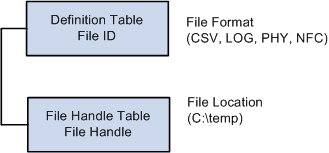
Use the File Handle Table component to define file handles that identify the export or import files and their physical location on the computer system. File handles are connected to the file IDs, which are set up using the Definition Table component.
This diagram shows the relationship between file IDs and file handles:
This diagram shows the relationship between file IDs and file handles.
Interface File Handle Table Page
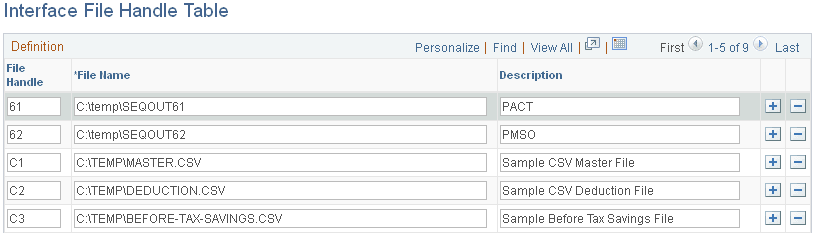
Use the Interface File Handle Table page (PI_FLHANDLE_PNL) to assign a handle to each external file that is imported or exported.
Navigation:
This example illustrates the fields and controls on the Interface File Handle Table page.
| Field or Control | Description |
|---|---|
|
File Handle |
Select to enter any combination of two-digit alphanumeric characters, regardless of the external file's format. Each file handle number should be assigned a unique process type (export or import). |
|
File Name |
Select to enter the exact path and file name that corresponds to the file handle's location. Be sure to use the appropriate syntax for your operating system (Windows-based, Unix-based, and so on). |