Verifying a Stop Transaction
To verify the stop transaction:
-
Terminate one of the benefits for the employee.
-
Run the Calculate Deductions and Deduction Confirmation processes.
-
Run the Export process.
Step 1: Terminate a Benefit
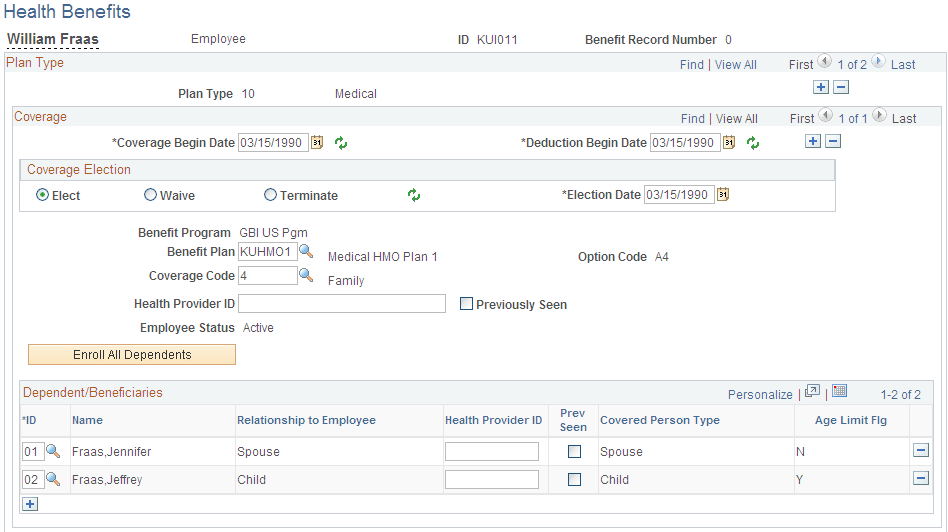
Terminate the medical benefits for the employee, deduction code KUHMOK.
Use the Health Benefits page to terminate the medical benefits.
Navigation:
This example illustrates the fields and controls on the Health Benefits page for Step 1: Terminate a Benefit.
Step 2: Run the Calculate Deductions and Confirmation Processes
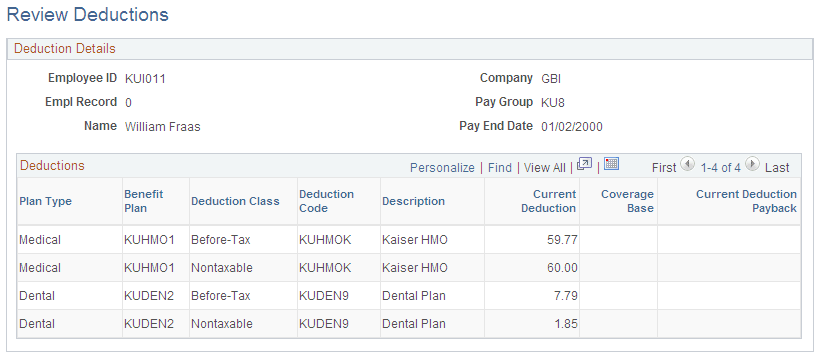
Calculate and confirm the deductions for the employee. The terminated medical benefits no longer appear.
Use the Review Deductions page to review the deductions.
Navigation:
This example illustrates the fields and controls on the Review Deductions page for Step 2: Run the Calculate Deductions and Confirmation Processes.
Step 3: Run the Export Process
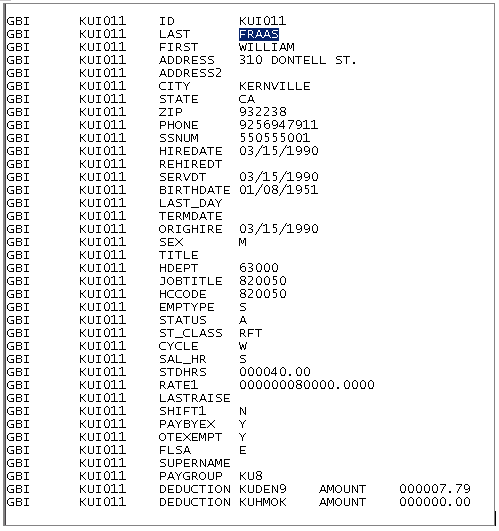
Run the Export process and review the export file. Notice that the stop transaction succeeded. The ZAMT or 000.00 value appears in the export file for deduction code KUHMOK, the terminated medical benefit.
This example illustrates the export file showing the stop transaction for deduction KUHMOK is the amount of 00.00.