Verifying a Transaction
To verify the transaction:
-
Run the Calculate Deductions and Confirmation processes.
-
Run the Export process.
Step 1: Run the Calculate Deductions and Confirmation Processes
Calculate and confirm the deductions for the employee.
Use the Calculate Deductions page to calculate the deductions:
Navigation:
This example illustrates the fields and controls on the Calculate Deductions page for Step 1: Run the Calculate Deductions and Confirmation Processes.
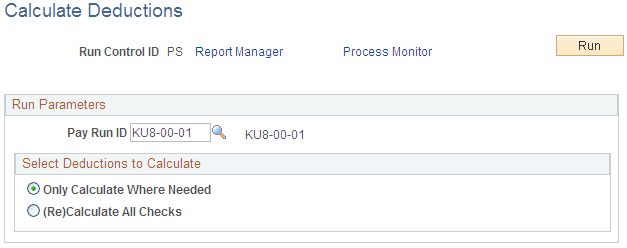
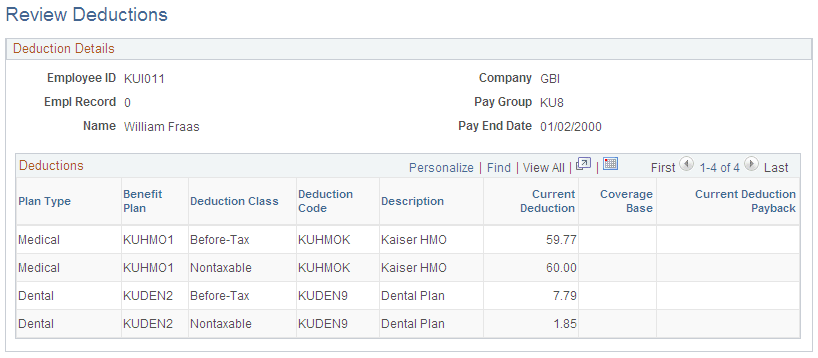
Review the results. The employee has medical and dental before-tax and nontaxable deductions. However, because the DEDCLS instance ID is set up, only the before-tax deductions will appear in the export file.
Use the Review Deductions page to review deductions.
Navigation:
This example illustrates the fields and controls on the Review Deductions page for Step 1: Run the Calculate Deductions and Confirmation Processes.
Step 2: Run the Export Process
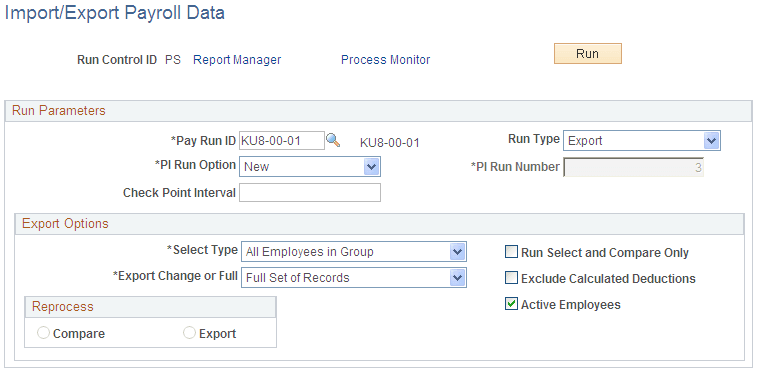
Use the Import/Export Payroll Data page to run the Export process:
Navigation:
This example illustrates the fields and controls on the Import/Export Payroll Data page for Step 2: Run the Export Process.
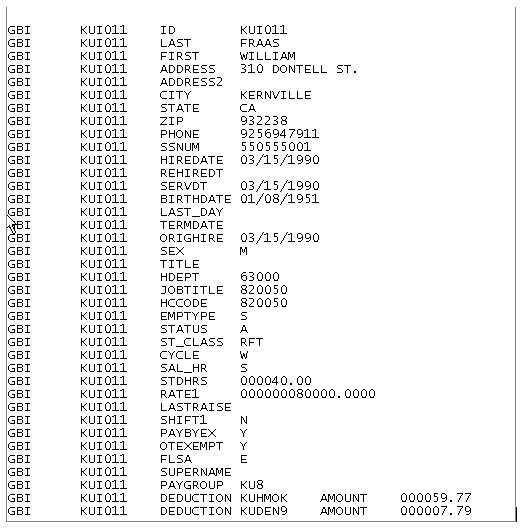
Review the export file. Because the instance ID DEDCLS is set up, only the before-tax deductions appear in the export file. Notice, however, that the transaction has worked. The DEDAMT or 59.77 value appears in the export file for deduction code KUHMOK:
This example illustrates the fields and controls on the Export file showing the transaction for deduction KUHMOK is the amount of 59.77.