Break Restore Rules Page
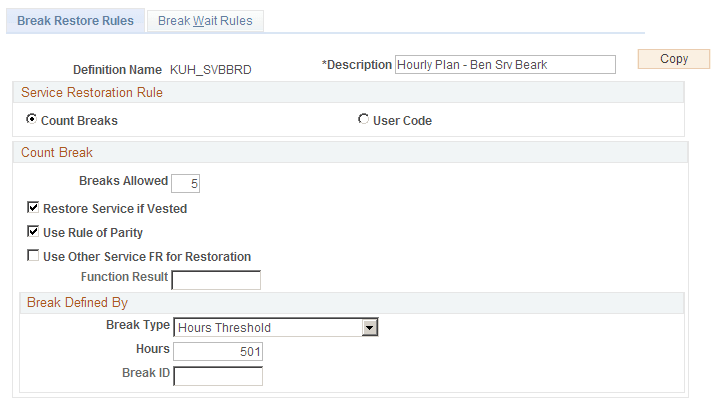
Use the Break Restore Rules page (PA_BREAK_PNL3) to set up general service restoration rules.
Navigation:
This example illustrates the fields and controls on the Break Restore Rules page.
| Field or Control | Description |
|---|---|
|
Copy |
This is a shortcut you can use to copy a similar definition. Establish the first definition, click the Copy button, enter a new name and description, and the system clones the original definition using the new name. You can then make whatever minor adjustments you need to the new definition. If you have to make major adjustments, consider creating the new definition from scratch instead of copying an existing definition. |
Service Restoration Rule
The service restoration rule establishes how you determine whether or not to restore service after break.
| Field or Control | Description |
|---|---|
|
Count Breaks |
Select this option when the number of consecutive one-year breaks determines whether service can be restored. |
| Field or Control | Description |
|---|---|
|
User Code |
Select this option for any other break method. |
Count Break
| Field or Control | Description |
|---|---|
|
Breaks Allowed |
Enter the minimum number of consecutive one-year breaks that disqualifies an employee from having previous service restored. |
|
Restore Service if Vested |
Select this option to make vested employees automatically eligible for service restoration, regardless of the number of one-year breaks. Vested employees are still subject to repayment and waiting period rules. Partially vested employees are considered vested. (The system can identify vested employees because periodic processing keeps employees' vesting histories.) |
|
Use Rule of Parity |
Select this option to make service restoration dependent on the length of the previous service and the length of the break. In this case, service is restored unless the break is longer than one of the following:
|
|
Use Other Service FR for Restoration (use other service function result for restoration) |
Select this option to make service restoration dependent on the length of the service obtained from an alternate function result. Enter the alternate function result in the text Function Result field. The break restore rules are applied to the service amount retrieved from the alternate function result. For example, your plan may require that vesting service be used to determine whether to restore prior benefit service after a break. In this case, you would enter the plan's vesting service function result in the text box. |
Break Defined By
If you count breaks, you need to establish what constitutes a one-year break. Do this in the Break Defined By group box.
| Field or Control | Description |
|---|---|
|
Break Type |
Select one of these break types:
|
Related Topics