Generating Data for a Plan's Annual Actuarial Valuation
This topic provides an overview of the actuarial valuation extract and discusses how to run the actuarial valuation extract.
Page Used to Generate Data for a Plan's Annual Actuarial Valuation
| Page Name | Definition Name | Usage |
|---|---|---|
|
RUNCTL_PASAV01 |
Generate the actuarial valuation extract files that are used to perform a plan's annual actuarial valuation. |
Understanding the Actuarial Valuation Extract
The actuarial valuation extract provides data that your actuary needs in order to perform a plan's annual actuarial valuation. The extract generates two extract files:
-
The "active" extract file, which contains information for those whose benefits are still accruing.
-
The "inactive" extract file, which contains information for those who are owed benefits, but whose benefits are no longer accruing.
Current employees who are covered under a plan, whether or not they have begun to participate, are typically active. Terminated employees, whether receiving benefits or awaiting deferred benefits, are typically inactive.
Actuarial Valuation Extract Page
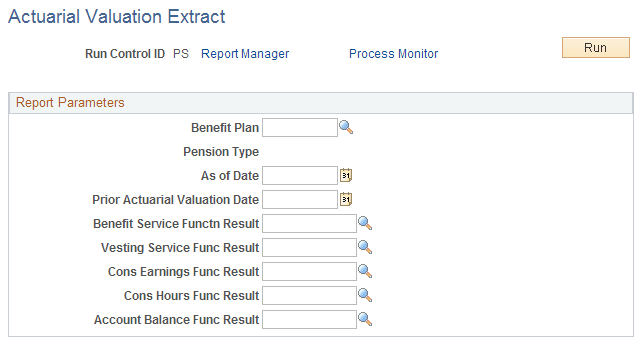
Use the Actuarial Valuation Extract page (RUNCTL_PASAV01) to generate the actuarial valuation extract files that are used to perform a plan's annual actuarial valuation.
Navigation:
This example illustrates the fields and controls on the Actuarial Valuation Extract page.
Because the actuarial valuation extract uses pension status codes, do not run the extract until you finish the periodic processing and payment processes for the year you are processing. These two processes change status codes, and you want to be sure all the status codes are current before you run the extract.
Report Parameters
To run the extract, enter the following parameters:
| Field or Control | Description |
|---|---|
|
Benefit Plan |
Select the plan for which you are running the extract. |
|
As Of Date |
Enter the date to establish the current year valuation category. |
|
Prior Actuarial Valuation Date |
Enter the date to establish the prior year valuation category. The current year and prior year dates are used to determine the extract files in which an employee is included: the active extract, inactive extract, or both. |
|
Benefit Service Functn Result, Vesting Service Func Result, Cons Earnings Func Result, Cons Hours Fun Result, and Account Balance Func Result (benefit service function result, vesting service function result, cons earnings function result, cons hours function result, account balance function result) |
Use these fields to direct the extract to the correct source of plan information that the actuary needs to see for each employee. Note: Account balances apply only to cash balance accounts. |
Related Topics