Setting Up Integration with PeopleSoft Receivables
PeopleSoft Pension Administration supports integration with PeopleSoft Receivables 9.2 for handling service purchase payments from plan participants.
The documentation for PeopleSoft Receivables provides detailed information about integration between the systems and about the Integration Broker setup and messages that support this integration. This topic discusses additional integration setup tasks that occur entirely within the PeopleSoft HCM system.
Pages Used to Set Up Integration With PeopleSoft Receivables
| Page Name | Definition Name | Usage |
|---|---|---|
|
Installation Table - Products Page |
INSTALLATION_TBL1 |
Select PeopleSoft Receivables as an installed product. See Enabling PeopleSoft Receivables on the HCM Installation Table |
|
Business Unit Reference Page |
BUS_UNIT_TBL_HR2 |
Map human resources business units to PeopleSoft Receivables business units. See Mapping Human Resources Business Units to PeopleSoft Receivables Business Units |
|
ENTRY_TYPE |
Define PeopleSoft Receivables entry types and reasons to use for service purchase payments. |
Enabling PeopleSoft Receivables on the HCM Installation Table
To use PeopleSoft Receivables to manage service purchase payments, use the Application Fundamentals: Products Page on the HCM Installation Table to identify PeopleSoft Receivables as an installed product.
Mapping Human Resources Business Units to PeopleSoft Receivables Business Units
This table describes two options for mapping HR business units to PeopleSoft Receivables business units:
| Scenario | Page Used | Navigation |
|---|---|---|
|
You use a single PeopleSoft Receivables business unit for all service purchase payments |
|
|
|
You use different PeopleSoft Receivables business units depending on an employee’s human resources business unit. |
|
Entry Types and Reason Codes Page
Use the Entry Types and Reason Codes page (ENTRY_TYPE) to define PeopleSoft Receivables entry types and reasons to use for service purchase payments.
Navigation:
This example illustrates the Entry Types and Reason Codes page.
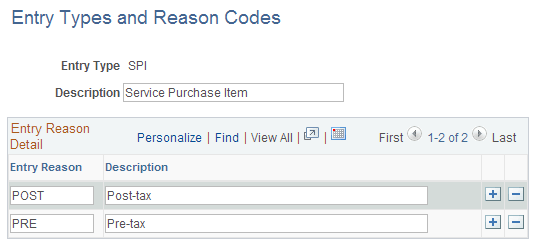
Entry Type and Entry Reason values are required by PeopleSoft Receivables to determine accounting information for all open items created. These values are defined in the PeopleSoft Receivables system.
| Field or Control | Description |
|---|---|
|
Entry Type and Description |
Create two entry types, one for debit items and one for credit items. Use the same entry type code and description that exist in the PeopleSoft Receivables system. |
|
Entry Reason |
For each entry type, create two entry reasons, one for pre-tax and one for post-tax. Use the same entry reason code and description that exist in the PeopleSoft Receivables system. |
Note:
You will reference these entry types and reasons on the Service Purchase Configuration - AR Integration Page.