Viewing Job History
This topic provides an overview of job data and discussed how to view job data.
Pages Used to View Job History
| Page Name | Definition Name | Usage |
|---|---|---|
|
PA_SAL_RATE_HIST |
View an employee's compensation history along with employee type, full time or part time status, and standard hours effective for each salary rate. |
|
|
PA_EMPL_TYPE_HIST |
View a chronological history of an employee's salaried or hourly status, full-time or part-time status, and regular or temporary status. |
|
|
PA_ACT_REASON_HIST |
View the events recorded in the Action/Reason fields in an employee's job record. |
Understanding Job Data
Pension calculations are based on job data that is subject to change: salary, employee type, and employee status. Use the Job History component to access a record of the changing values.
If an employee has multiple jobs, you can see data for any of those jobs.
Salary Rate History Page
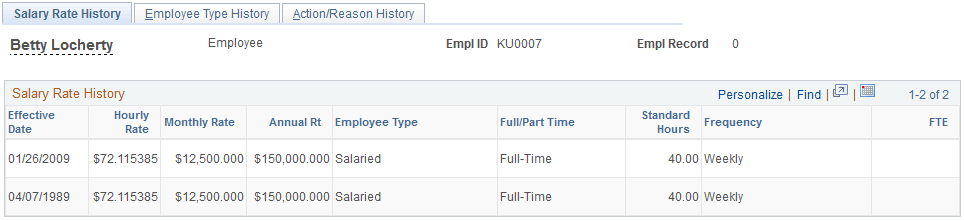
Use the Salary Rate History page (PA_SAL_RATE_HIST) to view an employee's compensation history along with employee type, full time or part time status, and standard hours effective for each salary rate.
Note:
This page displays one row for each salary change in the job record.
Navigation:
This example illustrates the Salary Rate History page.
Employee Type History Page
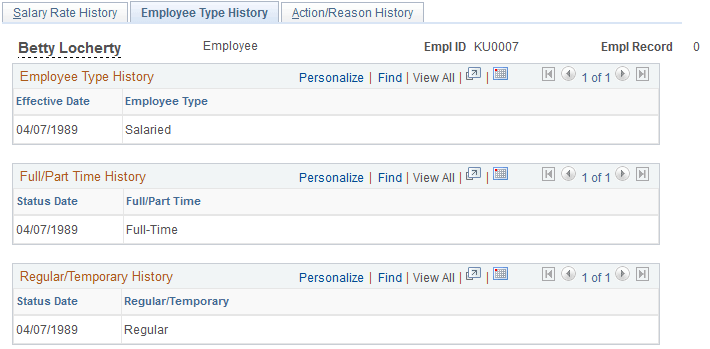
Use the Employee Type History page (PA_EMPL_TYPE_HIST) to view the history of an employee's salaried or hourly status, full-time or part-time status, and regular or temporary status.
Navigation:
This example illustrates the Employee Type History page.
Action/Reason History Page
Use the Action/Reason History page (PA_ACT_REASON_HIST) to view the events recorded in the Action/Reason fields in an employee's job record.
Navigation:
This example illustrates the Action/Reason History page.
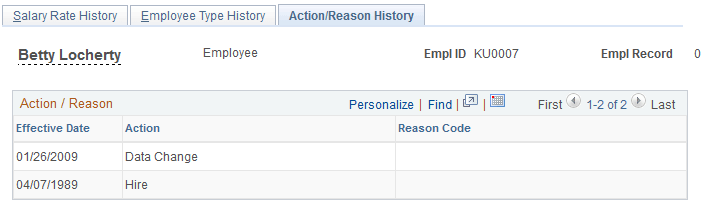
This page displays one row for each effective date in the Job record. Not all events are relevant to pension.