Deferring Tax Assets
This topic provides an overview of actual tax benefits and deferred tax assets and discusses how to run the Options Shares Exercised report.
Page Used to Run the Options Shares Exercised Report
| Page Name | Definition Name | Usage |
|---|---|---|
|
ST_RUNCTL_STOP003 |
Run the report to show the options exercised during a specific date range. |
Understanding Actual Tax Benefits and Deferred Tax Assets
Since the adoption of FAS 123R in December, 2004, when an option is exercised, the actual tax benefit realized at the time of exercise (typically the spread or gain realized by the participant at exercise) must be compared to the deferred tax asset originally recorded for the option (typically the fair value of the option determined at grant).
If the actual tax benefit exceeds the deferred tax asset, the excess is treated as additional paid-in capital. If the tax deduction realized on exercise is less than the expense record for the option, the shortfall reduces paid-in-capital. By comparing the values of the actual tax benefit and deferred tax benefit, you can determine whether your company has a reserve of paid-in-capital or a shortfall. A shortfall of paid-in-capital is deducted from reserve paid-in-capital. If no reserve of paid-in-capital exists then you must report the shortfall as additional tax expense.
Shares Exercised Page
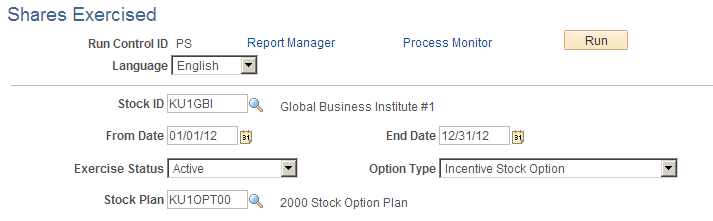
Use the Shares Exercised page (ST_RUNCTL_STOP003) to run the report to show the options exercised during a specific date range.
Navigation:
This example illustrates the Shares Exercised page.
| Field or Control | Description |
|---|---|
|
From Date |
Enter the beginning date for the period to be examined. |
|
End Date |
Enter the ending date for the period to be examined. |
|
Exercise Status |
Select the exercise status: Active, Pending, or Void. |
|
Option Type |
Choose the option type: ISO, ISO/SAR, NQ, NQ/SAR, or RSA. |