Action Basics
To help you process applicants, Talent Acquisition Manager provides a wide variety of predefined actions.
Applicant Actions and Recruiting Actions
The actions that you perform in Recruiting Solutions fall into two categories:
-
Applicant actions affect the overall applicant record rather than a specific application.
Examples include Forward Applicant, Send Correspondence, and Link Applicant to Job.
-
Recruiting actions relate to an application for a specific job opening (or an application without a job opening).
Examples include Edit Disposition, Reject Applicant, and Prepare Job Offer.
Pages Where Actions are Available
On these pages, where you see data representing applications for specific job openings (and applications without job openings), both recruiting actions and applicant actions are available:
On these pages (or page sections) that do not include the context of a job opening, the only available actions are applicant actions:
-
Manage Applicant Page, on the toolbar.
Note:
The Edit Application Details actions presents a special case. Although it is categorized as a recruiting action, it is also available from the Search Applicants page if the user performs a keyword search or an advanced search. These searches look directly at the data from the application record, so system does not need to identify a job opening to know which application to show.
Invoking Actions
The following table describes the types of page controls that can be used to invoke actions:
| Page Control | Description |
|---|---|
|
Toolbar Buttons |
Toolbar buttons on the Manage Applicant page provide one-click access to certain actions. |
|
Icon buttons |
These provide one-click access to the most commonly used actions for a specific context. |
|
Related action menus |
Click these related action menus to access context-specific lists of additional actions.
|
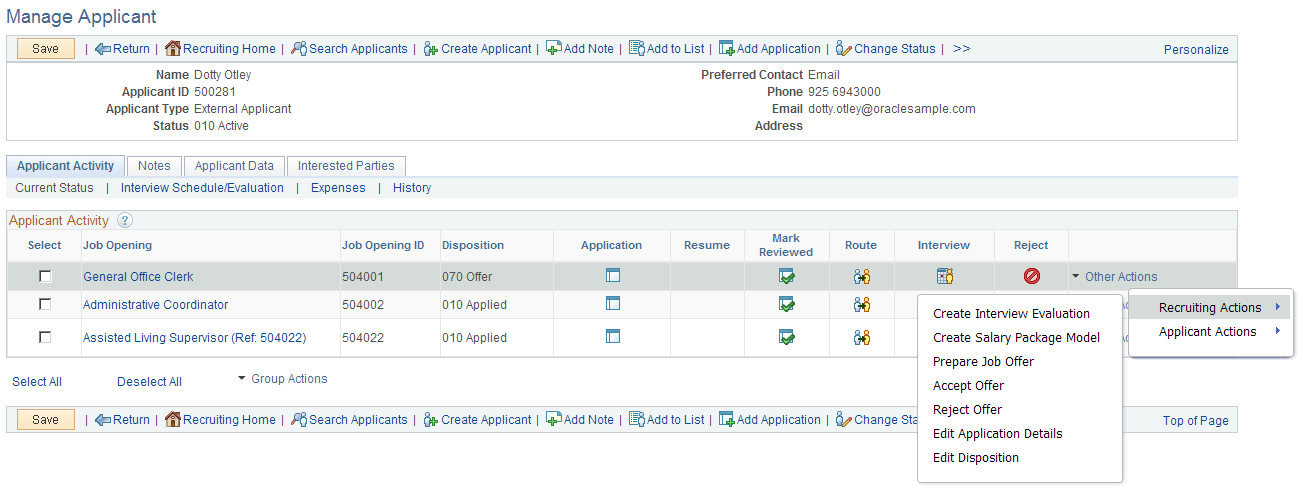
- The toolbar includes buttons for actions such as Add Note, Add to List, and Change Status actions. Clicking the scroll control after the last visible button displays additional action-related buttons.
- The Applicant Activity grid includes icon buttons for the Mark Reviewed, Route, Interview, and Reject actions.
- The Applicant Activity grid also includes the Other Actions menu, which displays various actions under the Recruiting Actions and Applicant Actions submenus.
- Under the Applicant Activity grid, the Group Actions menu similarly lists both recruiting actions and applicant actions. Group actions are performed on the selected grid rows.