Creating Applicant Contracts
This topic provides an overview of applicant contracts, lists prerequisites, and discusses how to manage applicant contracts.
Pages Used to Manage Applicant Contracts
| Page Name | Definition Name | Usage |
|---|---|---|
|
HRS_APP_CNTRCT1 |
Define basic contract information. |
|
|
HRS_APP_CNTRCT2 |
Define contract clause information. |
|
|
HRS_APP_CNTRCT3 |
Define the signature date and probation information. |
Understanding Applicant Contracts
If your organization uses employment contracts, you can use Talent Acquisition Manager to create applicant contracts and link them to an applicant during the prepare for hire process. If the employee is hired, this information is copied to the human resources database.
The pages for managing applicant contracts are similar to the pages for managing employee contracts. To access these pages, use the Manage Applicant Contracts action.
Note:
The Manage Applicant Contracts action is not available to hiring managers. This restrictions is based on users who have PeopleTools roles that are associated with the Hiring Manager recruiting role type.
Prerequisites
Before you create an applicant contract, you must:
-
Set up contract types.
-
Set up contract clauses.
-
Set up contract templates.
See PeopleSoft Human Resources Administer Workforce: Setting Up Workforce Contracts.
Contract Status/Content Page
Use the Contract Status/Content page (HRS_APP_CNTRCT1) to define basic contract information.
Navigation:
Select on any of these pages:
-
Manage Applicant
-
Search Applications
-
Manage Application
-
Manage Job Opening
This example illustrates the Contract Status/Content page.
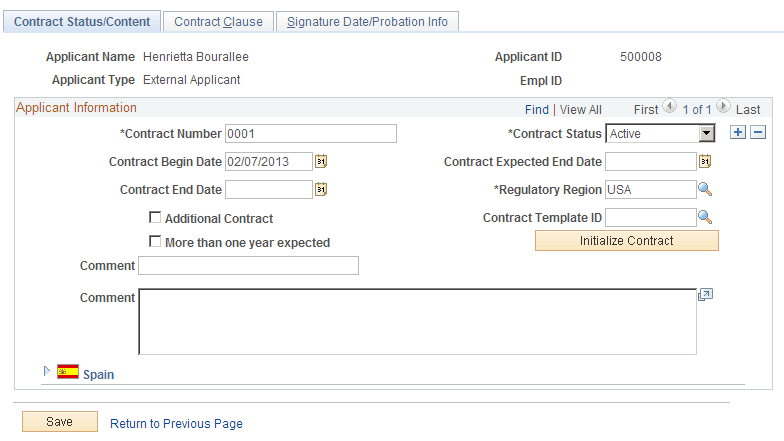
This page is similar to the PeopleSoft Human Resources Administer Workforce: Contract Status/Content Page for employees.
Contract Clause Page
Use the Contract Clause page (HRS_APP_CNTRCT2) to define contract clause information.
Navigation:
Select on any of these pages:
-
Manage Applicant
-
Search Applications
-
Manage Application
-
Manage Job Opening
Continue to the Contract Clause page.
This example illustrates the Contract Clause page.
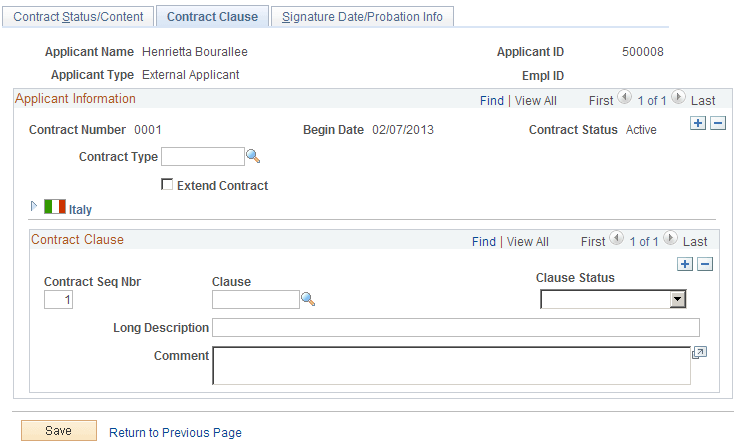
This page is similar to the PeopleSoft Human Resources Administer Workforce: Contract Type/Clauses Page for employees.
Signature Date/Probation Info Page
Use the Signature Date/Probation Info (signature date/probation information) page (HRS_APP_CNTRCT3) to define the signature date and probation information.
Navigation:
Select on any of these pages:
-
Manage Applicant
-
Search Applications
-
Manage Application
-
Manage Job Opening
Continue to the Signature Date/Probation Info page.
This example illustrates the Signature Date/Probation Info page.
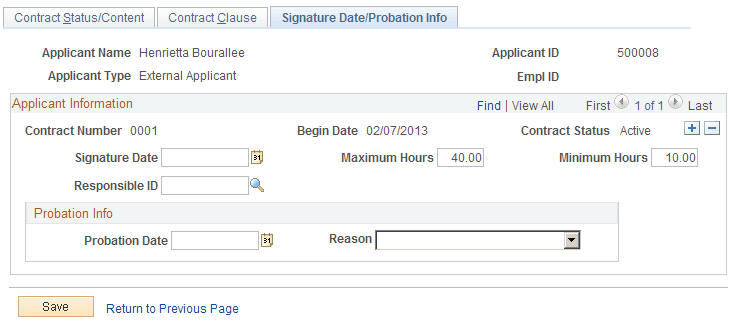
This page is similar to the PeopleSoft Human Resources Administer Workforce: Contract Data - Signature Date/Probation Info Page for employees.