My Job Openings (Classic)
Use the My Job Openings (Classic) pagelet (HRS_PE_MY_JO) to display job openings that you created or where you are on the hiring team. Personalize the pagelet to control which of your job openings appear. Personalizations include the job opening status and how long ago the job opening was created.
This example illustrates the My Job Openings (Classic) pagelet.
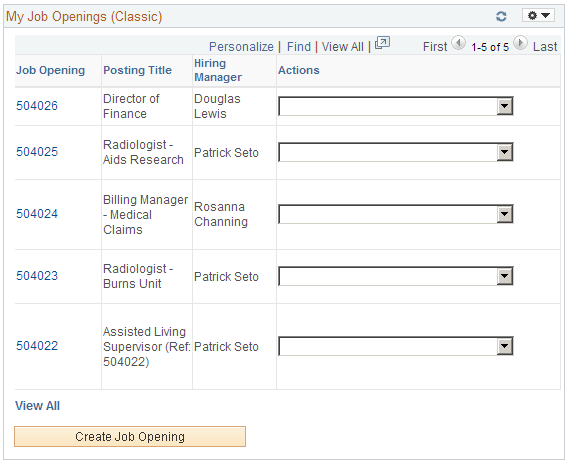
List of Job Openings
Note:
The personalization options for the pagelet offer 11 possible columns to include in the job openings grid, but the grid can only display a maximum of five columns.
| Field or Control | Description |
|---|---|
|
Job Opening |
Displays the job opening ID. Click the link to access the Manage Job Opening page, where you can review detailed information about the job opening. |
|
Posting Title |
Displays the primary posting title for the job opening. Select the Job Opening Title check box on the Personalize My Job Openings page to display this value. |
|
Location |
Displays the primary location (not the recruiting location) for the job opening. |
|
Hiring Manager |
Displays the primary hiring manager for the job opening. |
|
Status |
Displays the current status of the job opening. |
|
Days Open |
Displays the number of days since the job opening was approved and opened. |
|
Target Openings |
Displays the number of target openings for this job opening. |
|
Number Filled Openings |
Displays the number of openings that have been filled for this job opening. |
|
Total Applicants |
Displays the number of applicants attached to this job opening. |
|
|
Displays an Activity icon that you click to access the Manage Job Opening page: Activity & Attachments tab. |
|
Actions |
Select an action to perform. The system launches the appropriate page for the action. Select from the following options:
|

Additional Page Elements
| Field or Control | Description |
|---|---|
|
View All |
Click this link to access the Browse Job Openings page. The personalization options for the pagelet do not persist when you transfer to the Browse Job Openings page. |
|
Create Job Opening |
Click to access the Primary Job Opening Information page where you can begin the process of creating a job opening. |