Profile Integration Options
When creating job openings, you can automatically populate the profile-based job qualifications with content items from selected profiles.
For example, when replacing a key employee, you can copy attributes such as competencies and languages from the employee's profile into the job opening. Similarly, you can pull requirements from a job profile. You can even combine requirement sources by selecting multiple profiles from which to load requirements.
The recruiting system provides two layers of profile integration:
-
Standard profile integration enables users to explicitly select person and non-person profiles to load.
The option to explicitly select non-person profiles is always available if profile integration is active, but a separate configuration setting enables you to choose whether to also allow users to explicitly select person profiles.
-
Expanded profile integration enables the system to identify job profiles to load based on the job code, position number, job family, or salary grade of the job opening.
If you activate this option, you choose which job opening field the system uses when identifying profiles to load. The setting for this option is in the recruitment template and can therefore vary depending on the job opening.
Profile Integration Configuration
Activate standard profile integration on the Recruiting Installation - General Page.
The Allow Profile Utilization field on this page is the control switch for profile integration. Set the value to Yes to activate profile integration. When this option is turned on, users are able to explicitly choose non-person profiles to import into the job opening.
If profile integration is active, the Allow Person Profile Integration field on the same page becomes editable. Set this value to Yes to allow users to explicitly identify person profiles as well as non-person profiles
Activate expanded profile integration on the Recruitment Template Page. Use the Load Rqmts from Job Profile (Load Requirements from Job Profile) drop-down list box to choose the specific job opening field from which profile data is pulled (job code, position number, job family, or salary grade). If you do not want to activate expanded profile integration, select Not Used.
Important:
Expanded profile integration is available only if standard profile integration is active. When standard profile integration is off, the Load Rqmts from Job Profile field remains editable, but the settings are ignored.
Process Flow for Standard Profile Integration
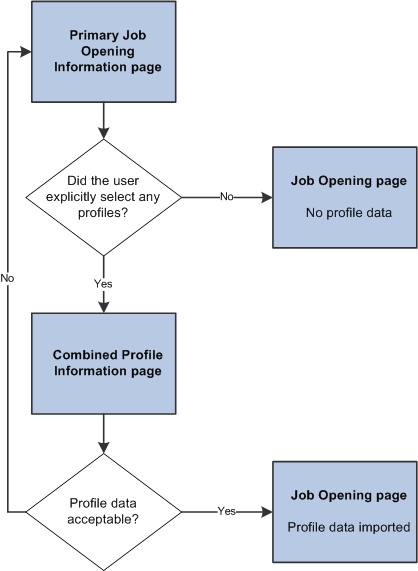
A user who creates a job opening starts on the Primary Job Opening Information page. Under standard profile integration, this page displays the fields where users can explicitly identify profiles to load.
If the user selects any profiles, then before the system displays the job opening, the Combined Profile Information page displays a preview of the data to be imported. After reviewing the data, users can decide whether to continue to the job opening or return to the previous page to change the profile selection.
This diagram illustrates the process of explicitly selecting profiles, previewing their content, and adding the content to the job opening:
Note:
If you segment your job openings by job profile, there is an additional Job Profile field on the page, separate from the grids where you otherwise identify profiles to use. If you segment by job profile, this is a required field, and the profile you enter is also imported into the job opening.
Process Flow for Expanded Profile Integration
Under expanded profile integration:
-
The system imports data from explicitly identified profiles, just as it does under standard profile integration.
-
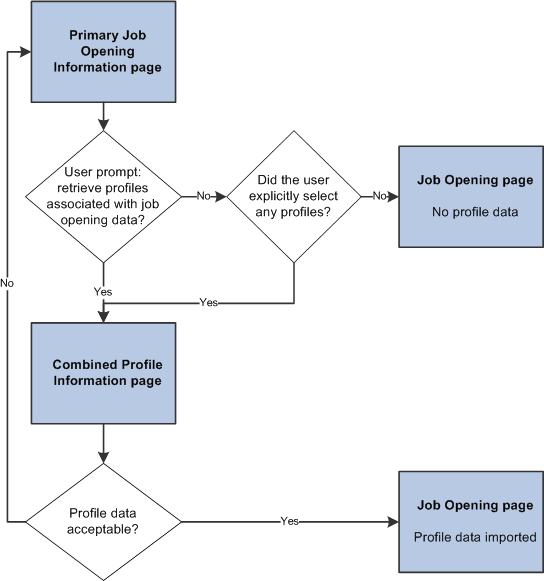
The system also identifies profiles that are associated with the job code, job family, position, or salary grade for the job opening, and it gives the user an option to import these profiles as well.
The type of job opening data that is used for the expanded profile integration is based on the setting in the Load Rqmts from Job Profile field on the recruitment template. To import data based on job family or salary grade data, you must use job family or salary grade as the segmenting type. Otherwise, users are not able to enter the specified data on the Primary Job Opening Information page.
Under expanded profile integration, the system always asks users to verify that they want to load the profile data that is associated with the job opening data. (Explicitly identified profiles are always loaded, regardless of whether the user chooses to also load the associated profiles.)
This diagram illustrates the expanded profile integration process flow. In this flow, users must verify that they want to load the profiles that are associated with the job opening data. The Combined Profile Information page appears if either explicitly identified profiles or associated profiles are loaded.