Data Loaded from Profiles
This topic discusses the data that is brought into job openings from profiles.
Content Item Selection
When the system imports profile data, it copies only the content items for the content types that are included in the job opening template. For example, if the job opening has sections for competencies and degrees, but not for language skills, then any language skills in the source profile are not copied to the job.
The system copies content items only if the content type structure is the same in the source profile and in the primary person profile type. Additionally, only content items with the same instance qualifier setup as the primary person profile type are copied. For example, if you select a nonperson JOB profile to copy, but its instance qualifiers for competencies are different from those in the primary person profile type, then any competencies associated with the JOB profile are not copied into the job opening.
Note:
When copying content items with instance qualifiers, the system copies only items with instance qualifiers that are viewable by employees. The ability for employees to view specific instance qualifiers is part of the instance qualifier setup in the Manage Profiles business process.
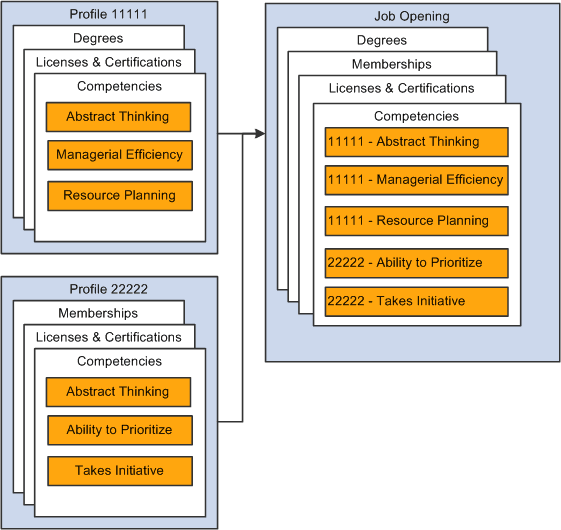
This diagram illustrates the consolidation of content items from the source profiles into the job opening. In the diagram, the system copies data from two profiles into the job opening. Competencies from both profiles are added to the job opening, and each competency in the job opening retains information about the profile from which it came.
Note:
Content items that exist in multiple source profiles are added to the job opening only once. If one profile has a version with a later effective date, then the system brings that later version and its Profile ID into the job opening.
Limiting Content Items Based on Instance Qualifiers
Profile architecture uses the concept of an Instance Qualifier to organize content types according to specified data.
For example, in the case of competencies, the evaluation type (self-evaluation, manager evaluation, and so forth) is the instance qualifier. The instance qualifier setup for competencies not only lists the evaluation types, it indicates which ones employees can view (for example, employees can view manager evaluations, but not peer evaluations), and which one is the default value for employees (for competencies, Self is the employee default).
Talent Acquisition Manager processes job opening content items with instance qualifiers according to these rules:
-
Content items are copied only if the instance qualifier configuration for the source profile's profile type matches the instance qualifier configuration for the primary person profile type.
For example, if the primary person profile type uses the evaluation type as an instance qualifier for competencies, then the system copies competency content items only from profiles that also use the evaluation type as an instance qualifier.
Note:
Be sure that the Primary Person Profile Type and any non-person profile types that you use in Recruiting have the exact same instance qualifier setup, including marking the same instance qualifiers as required. If an instance qualifier is required in the Primary Person Profile Type but not in the imported profile type (for example, JOB), then the imported content item might be lacking a qualifier that is required in the job opening, and you will not be able to save the job opening.
-
When the system copies content items into a new job opening, it copies only items that are visible to employees.
For example, competency ratings with the evaluation type Peer are not copied to the job opening.
-
When the system copies content items into a new job opening, it copies only the latest effective-dated content items in the profile are copied.
For example, if an employee enters annual self-evaluations for competencies, the content item representing the most recent self-evaluation is copied into the job opening.
-
When a content type is used in screening, the description of the content items shows the instance qualifier.
For example, if the Competencies grid in a job opening includes two rows for analytical thinking, one row for a self-evaluation and one row for a supervisor/manager evaluation, then when you set up screening for the job opening, the list of available screening requirements includes two rows for the analytical thinking competency, one row where the description shows that this is for a Supervisor/Manager proficiency rating, and one where the description shows that it is for a Self proficiency rating.
-
When the system loads content items from a job opening into the Candidate Gateway application form (because the Content Section Configuration page is configured to prevent applicants from adding items themselves), it loads only items that are visible to employees.
For example, if a Job Opening has four competencies, and the first two have the evaluation type Self and the last two have the evaluation type Official, only the first two items appear in the Candidate Gateway online application form.
Note:
Under the delivered configuration, competency evaluation types and ratings are included when you add a competency to a job opening, but the rating is informational only. That is, the screening process does not check if the applicant has the rating that appears in the job opening. Instead, the screening process awards applicants points based on the applicant's rating and the points scale that you establish in the screening criteria. You can, however, configure the system to screen for a specific rating (for example, to check whether the applicant has a self-evaluation proficiency of Excellent for a particular competency).
The Primary Profile and Profile Updates
Job openings retain an association with the profiles whose data is imported. One of the profiles must be designated as the primary profile. The grid where you designate the primary profile is always visible on the Combined Profile Information page. It is visible in the job opening only if the job opening template includes the Profile Details section.
Any content items that you manually add to the job opening are associated with the primary profile, unless there is a profile type configuration incompatibility, in which case the profile ID for the new content item is 0. (The system also assigns a profile ID of 0 when there are no profiles associated with the job opening.)
For example, when you create a job opening, the hiring manager might provide updated requirements that you can then transfer back to the job profile, maintaining consistency and eliminating redundant work efforts.
If the primary profile is a non-person profile, you can optionally update the profile based on changes you make to the job opening data. Activate this option by selecting the Updates Allowed check box in the same grid where you designate the primary profile.