Reviewing the Integration Transaction Log
This topic discusses how to review the integration transaction log.
Pages Used to Review the Integration Transaction Log
| Page Name | Definition Name | Usage |
|---|---|---|
|
HRS_HROI_LOG |
Review the integration transaction log. |
|
|
Integration Log Outgoing Msg Page(integration log outgoing message page) |
HRS_HROI_LOG_O_XML |
Review detailed information about outgoing messages. |
Integration Log Page
Use the Integration Log page (HRS_HROI_LOG) to review the integration transaction log.
Navigation:
This example illustrates the Integration Log page.
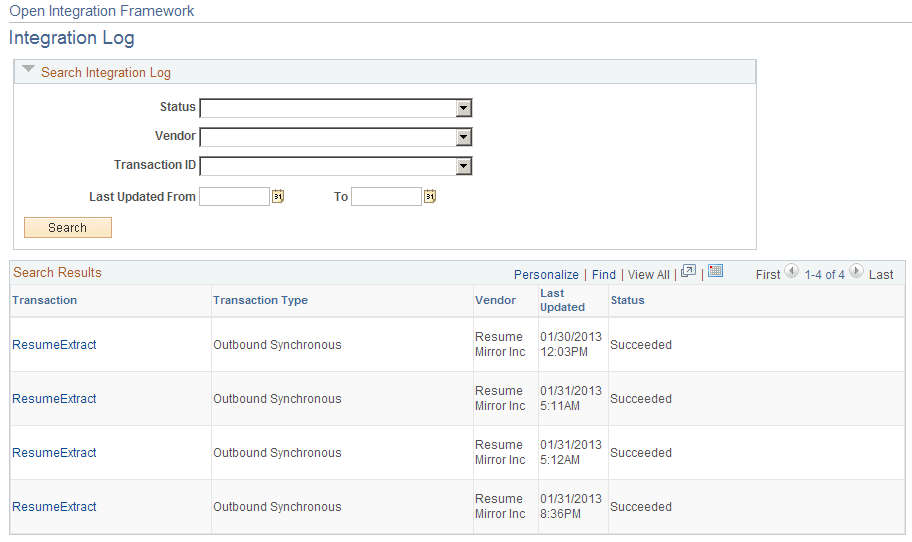
Search Results
This group box displays the messages received from vendors that match the search criteria that you enter in the Search Integration Log group box.
Integration Log Outgoing Msg Page
Use the Integration Log Outgoing Msg (integration log outgoing message) page (HRS_HROI_LOG_O_XML) to review detailed information about outgoing messages.
Navigation:
This example illustrates the Integration Log Outgoing Msg page .
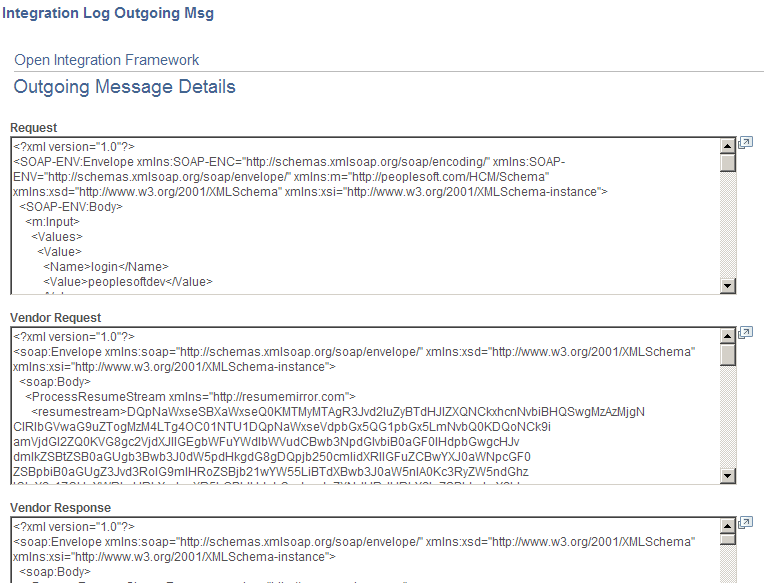
This page includes the following fields that display detailed information about integration messages:
-
Request
-
Vendor Request
-
Vendor Response
-
Response
-
Error