Setting Up the Job Posting Description Library
To set up the job posting description library, use the Posting Descriptions (HRS_JO_PST_DSC_TBL) and Posting Descriptions Library (HRS_JO_PST_LIB_TBL) components.
Pages Used to Set Up the Job Posting Description Library
| Page Name | Definition Name | Usage |
|---|---|---|
|
HRS_JO_PST_DSC_TBL |
Define posting description types. |
|
|
HRS_JO_PST_LIB_TBL |
Create posting descriptions. |
Understanding the Job Posting Description Library
Job postings that are posted to a job board or intranet include a description of the job opening. When you create job postings, you can optionally bring in predefined content from the posting description library. Using content from the library enables you to standardize job posting content.
Note:
You also have the option to enter freeform text and graphics when you create a job posting.
Posting description types are categories of boilerplate text. For example, you may want categories for information that:
-
Positions your organization within the market.
-
Outlines the job responsibilities.
-
Lists the qualifications that an applicant must have for this job opening.
-
Explains how to apply for the job opening.
When you create a library entry, you associate it with a specific description type.
Posting Description Type Page
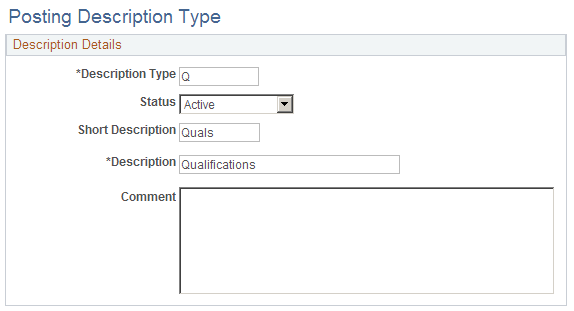
Use the Posting Description Type page (HRS_JO_PST_DSC_TBL) to define posting description types.
Navigation:
This example illustrates the Posting Description Type page.
Posting Description Library Page
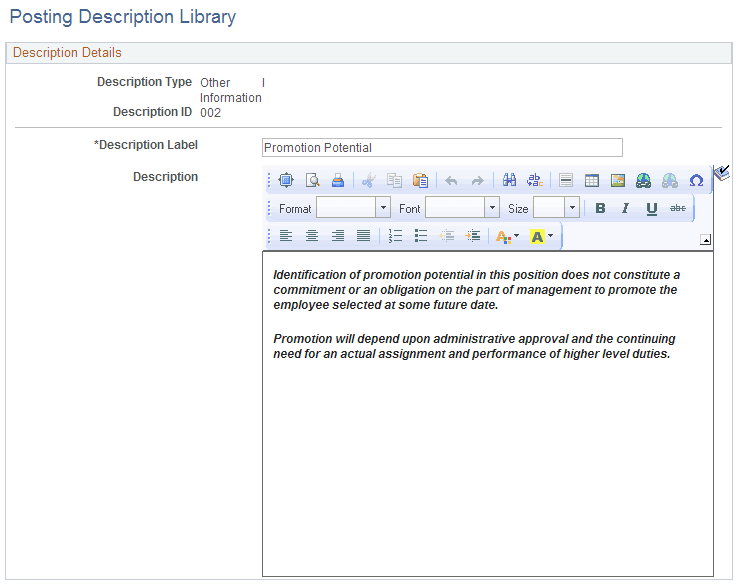
Use the Posting Description Library page (HRS_JO_PST_LIB_TBL) to create posting descriptions.
Navigation:
This example illustrates the Posting Description Library page.
| Field or Control | Description |
|---|---|
|
Description Label |
Enter the text to be used as a section label in the job posting. |
|
Description |
Enter content for this library entry. Content can include text and graphics, and can be formatted to enhance the presentation of your content. |