Understanding the Resume Extraction Process
Resume extractors extract data from applicant resumes and move the data into Recruiting Solutions tables. Organizations can use multiple resume extractors. For example, you can use a different resume extractor for each country in the organization, or you can use different resume extractors for each recruitment source from which you receive resumes.
The resume extractor that the system selects to use depends on the resume extractor that you specify for a recruitment source, a site, or the extractor that you specify when you run the Resume Load Process or run an extraction from the Manage Resumes (HRS_AL_LOG) component. If an applicant attaches their resume to their online application in Candidate Gateway, the system uses the resume extractor that is specified on the Site - Setup Site page for that online application site. If the resume comes from a specific recruitment source; for example, a recruiting agency, the system uses the resume extractor that you specified in the Source Setup component when you set up the recruitment source. When you load resumes by using the Resume Load Process, you select which extractor to use when you run the process.
Resume extractors extract data from an applicant's resume. Not all extractors extract the same data. PeopleSoft software supports the following data from the extractors:
-
Contact information: applicant name, home address, telephone numbers, and email address.
-
Prior work experience.
-
Secondary education.
-
Qualifications including licenses and certificates, languages, memberships, honors and awards, and competencies.
-
Referrals.
-
Full resume text.
Upon successful extraction, the system creates a record for the applicant in the Manage Applicant component, and populates fields in the Manage Applicant component for the applicant. The system also assigns the applicant an applicant ID, a status, a resume name, adds the original resume as an attachment, and associates any job openings that might be applicable. If the applicant attaches a resume when they apply online through Candidate Gateway, the resume extractor populates fields in the applicant's online application and referrals. Of course, this presumes that the extractor actually extracted this data.
Note:
The resume extraction process isn't required for applicants to apply for job openings online by using Candidate Gateway.
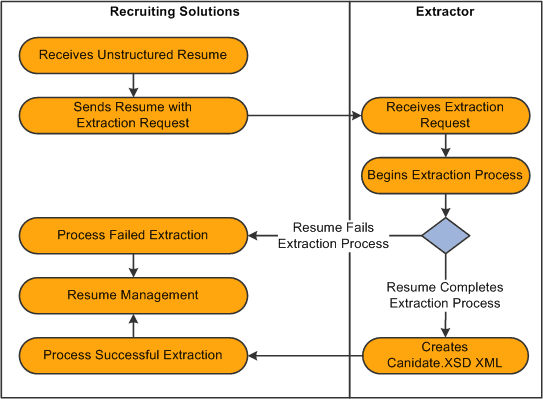
This process flow shows the resume extraction process starting with receipt of an unstructured resume and ending when the results of the successful or failed extraction are saved to the resume management tables in PeopleSoft Recruiting Solutions.
This diagram illustrates the resume extraction process.