Assigning Schedules to a Group
This section discusses how to assign group schedules.
Pages Used to Assign Schedules
| Page Name | Definition Name | Usage |
|---|---|---|
|
SCH_GRP_ASSIGN |
Assign a group of time reporters or a single time reporter to a schedule. |
Assign Schedule to a Group Page
Use the Assign Schedule to Group page (SCH_GRP_ASSIGN) to assign a group of time reporters or a single time reporter to a schedule.
Navigation:
This example illustrates the fields and controls on the Assign Schedule to Group page. You can find definitions for the fields and controls later on this page.
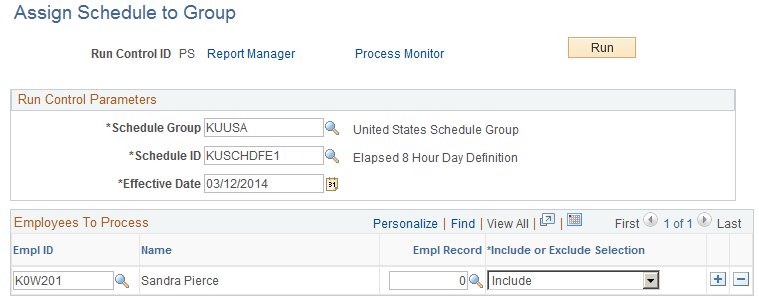
| Field or Control | Description |
|---|---|
|
Schedule Group |
Select the schedule group you require. |
|
Schedule ID |
Select the schedule that you are assigning. The system only displays related values based on the Schedule Group selected. |
|
Rotation ID |
If you select a rotating schedule, as well as assigning the Schedule ID, you also need to assign a Rotation ID. |
|
EmplID (employee ID) |
Select the time reporter to include or exclude from this group schedule assignment. |
|
Empl Rcd Nbr (employee record number) |
Select the appropriate value for this time reporter. |
|
Group ID |
Select the dynamic or static group for which you want to assign a schedule. |
|
Include/Exclude Indicator |
Select whether to include or exclude the time reporter indicated in this row. If you create a row to exclude a time reporter and then enter a row with the group that includes that time reporter, the time reporter is excluded from the group schedule assignment. The order in which you add rows does not affect the result. |