Defining Rule Elements
To define rule elements, use the Rule Element 1 through Rule Element 5 (TL_RULE_ELEM1_PNL, TL_RULE_ELEM2_PNL, TL_RULE_ELEM3_PNL, TL_RULE_ELEM4_PNL and TL_RULE_ELEM5_PNL) components. Use the TL_RULE_ELEM1_PNL, TL_RULE_ELEM2_PNL, TL_RULE_ELEM3_PNL, TL_RULE_ELEM4_PNL and TL_RULE_ELEM5_PNL component interfaces to load data into the tables for these components.
This section discusses how to create user-defined rule elements.
Page Used to Define Rule Elements
| Page Name | Definition Name | Usage |
|---|---|---|
|
TL_RULE_ELEM1_PNL TL_RULE_ELEM2_PNL TL_RULE_ELEM3_PNL TL_RULE_ELEM4_PNL TL_RULE_ELEM5_PNL |
Create user-defined values that the system can evaluate during the Time Administration process. |
Rule Element 1 through Rule Element 5 Pages
Use the Rule Element 1 through Rule Element 5 pages (TL_RULE_ELEM1_PNL, TL_RULE_ELEM2_PNL, TL_RULE_ELEM3_PNL, TL_RULE_ELEM4_PNL, TL_RULE_ELEM5_PNL) to create user-defined values that the system can evaluate during the Time Administration process.
Navigation:
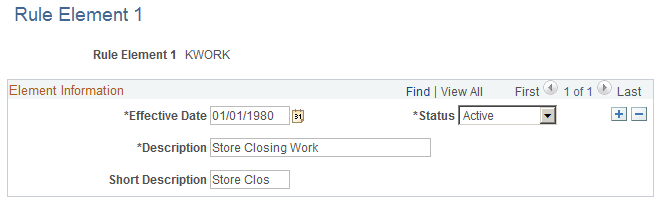
This example illustrates the fields and controls on the Rule Element 1 page. You can find definitions for the fields and controls later on this page.
Note:
If you want to relabel the rule element fields, see the instructions in your PeopleTools PeopleBook.