Integrating Absence Management, Time and Labor, and Payroll for North America
This section discusses:
-
Absence event processing.
-
Levels of Absence Management and Time and Labor integration.
Absence Event Processing
When Payroll for North America, Absence Management, and Time and Labor are integrated, you run the Absence Conversion process after the Absence Entitlement process is completed to send absence event data directly from Absence Management to Payable Time in Time and Labor.
See PeopleSoft Absence Management: To Payroll for North America Page.
Note:
This process is to generate payable time rows for absence for North American Payroll only.
All absence rows for employees that are enrolled in Time and Labor are sent, regardless of whether the Take codes are mapped to TRCs. Time and Labor processes the rows that are mapped to TRC and deletes these rows. For the rows where the Take code is not mapped to a TRC the process ends and a message log is generated to display all those Take codes. You need to map the remaining rows to a TRC. After you map the rows, restart the process using the Process Monitor. When the process restarts, it determines if unprocessed rows exist and it processes the mapped rows first. If other rows are still not mapped, the process stops, a message log is created, and you need to repeat the procedure to map the Take codes to a TRC. The process terminates when there are no more unprocessed rows.
Note:
If data is intentionally not mapped, and you do not want these rows to be sent to Time and Labor, the Process Instance can be cancelled or deleted by selecting one of those options in the Update Process group box on the Process Monitor page.
At this stage, no cost is associated with the time. When all the payroll processes are completed, the associated costs and details are sent to Time and Labor. Payable Time rows will get updated with distributed and diluted costs, if needed.
Levels of Absence Management and Time and Labor Integration
The levels of integration between Absence Management, Time and Labor, and Payroll for North America include:
-
Mapping. Absence pay groups must be set up and configured, time reporting codes in Time and Labor for Payroll North America and Absence Management must be set up, and Absence Management Earnings to Payroll for North America Earnings must be set up.
-
Job Level. Assign the Job record to Payroll for North America and Absence Management (PNA/AM mapped pay groups) and enroll the time reporter in Time and Labor.
-
Absence Management Process. Run the Absence Management conversion (AE program) that invokes a Time and Labor process to update Payable Time. After the process is completed, Payable Time in Time and Labor will include absence positive input, if available.
Note:
Absence Management allows you to define multiple earnings while setting up the absence take. This enables a single absence take to produce multiple rows of payable time in Time and Labor.
-
Time and Labor and Payroll for North America Process . Run the Time Administration process in Time and Labor to generate payable time. Run the Load Time and Labor to Paysheets process from Payroll for North America and then the Paysheets process.
Note:
The Time Administration process enables rules to process all of the absence time reporting codes associated with the generated positive input, whether the absence take has one or many earnings as part of the positive input membership list.
Examples of Absence Takes with Multiple Earnings
Absence Management enables you to define multiple earnings during the set up of an absence take.
For example, the following sample page displays the Absence Take - Day Formula page with two earnings listed in the Generate Positive Input Member List region:
This example illustrates the fields and controls on the Example: Absence Take - Day Formula page with two earnings. You can find definitions for the fields and controls later on this page.
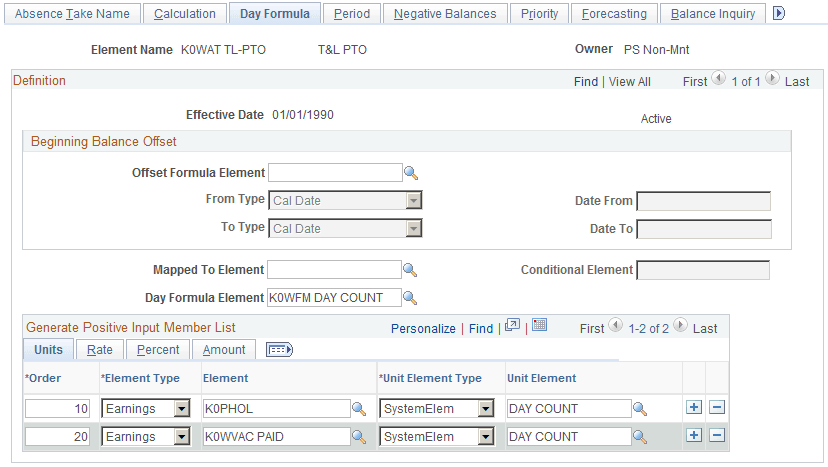
For the following examples, each of the earnings displayed on the Absence Take – Day Formula page is associated with a valid Time Reporting Code.
This table illustrates the relationship between the Absence Earnings Code, the Time Reporting Code, and the Payroll for North America Earnings Code for the example K0WAT TL-PTO absence take element:
| Absence Earnings Code | Time Reporting Code | PNA Earnings Code |
|---|---|---|
|
K0PHOL |
K0PTO |
PTO |
|
K0WVAC PAID |
KW7 |
VAC |
Example One:
This table displays the absence hours entered by a Time Reporter:
| TRC | Mon | Tue | Wed | Thu | Fri | Process Generating Payable Time |
|---|---|---|---|---|---|---|
|
K0PTO |
8 |
8 |
8 |
N/A |
Running the Absence Management conversion program creates the payable time shown in the following table:
| TRC | Mon | Tue | Wed | Thu | Fri | Process Generating Payable Time |
|---|---|---|---|---|---|---|
|
K0PTO |
8 |
8 |
8 |
N/A |
||
|
KW7 |
8 |
8 |
8 |
Absence Conversion |
This table illustrates the payable time created once the Time Administration process runs, which enables rules to process all of the absence time reporting codes associated with the generated positive input:
| TRC | Mon | Tue | Wed | Thu | Fri | Process Generating Payable Time |
|---|---|---|---|---|---|---|
|
K0PTO |
8 |
8 |
8 |
N/A |
||
|
KW7 |
8 |
8 |
8 |
Absence Conversion |
||
|
KUOVT |
8 |
Time Administration Rules (Create Overtime Rule Threshold > 40 of KUREG + K0PTO + KW7) |
Example Two:
The following table displays the absence hours entered by a Time Reporter:
| TRC | Mon | Tue | Wed | Thu | Fri | Process Generating Payable Time |
|---|---|---|---|---|---|---|
|
K0PTO |
8 |
8 |
8 |
8 |
8 |
N/A |
Running the Absence Management conversion program creates the payable time shown in the following table:
| TRC | Mon | Tue | Wed | Thu | Fri | Process Generating Payable Time |
|---|---|---|---|---|---|---|
|
K0PTO |
8 |
8 |
8 |
8 |
8 |
N/A |
|
KW7 |
8 |
8 |
8 |
8 |
8 |
Absence Conversion |
This table illustrates the payable time created once the Time Administration process runs, which enables rules to process all of the absence time reporting codes associated with the generated positive input:
| TRC | Mon | Tue | Wed | Thu | Fri | Process Generating Payable Time |
|---|---|---|---|---|---|---|
|
K0PTO |
8 |
8 |
8 |
8 |
8 |
N/A |
|
KW7 |
8 |
8 |
8 |
8 |
8 |
Absence Conversion |
|
KUOVT |
8 |
8 |
Time Administration Rules (Create Overtime Rule Threshold >24 of KUREG + KW7) Note: K0PTO is not part of the value list. |