Understanding Absence Event Integration with Time and Labor
Absence Management integration involves absence event data that is entered in Absence Management or Time and Labor, and is either integrated with either Payroll for North America or Global Payroll.
This diagram shows that absence events can be entered through either Absence Management or on the Timesheet page in Time and Labor
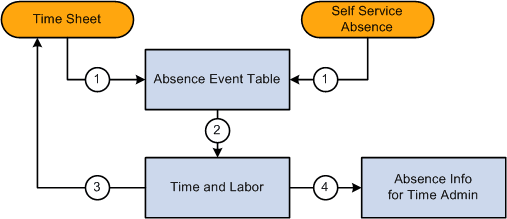
The Timesheet component in Time and Labor provides a link that enables you to enter absence event information. You can add, delete, cancel, and edit absence events for the current period of interest. Employees must be enrolled in Time and Labor to use the absence grid on the Timesheet page.
See Timesheet Page.
The Allow entry in Timesheets check box must be selected on the Country-Take setup page in Absence Management to make the absence Take eligible for use on the Absence Event grid on the Timesheet page. Absence event data that is entered in Absence Management using an ineligible Take code (for Time and Labor) may appear on the Absence Event grid in Time and Labor, but cannot be modified.
Note:
During implementation of the integration of Absence Management and Time and Labor, you must complete an analysis of your current absence Take codes that are linked to TRCs. Enable those Take codes that you want to make available for absence event entries on the Timesheet page using the Country-Take setup page in Global Payroll and Absence Management.
See PeopleSoft Absence Management: Understanding Self Service Setup Tasks.
Security Considerations
During implementation, align the setup of security for absence requests (in Absence Management) with absences entered on the Timesheet page (Time and Labor) so that the same manager is responsible for viewing or approving absences regardless of where the absence event entry is made. Setup the system so that absences that require multiple levels of approval cannot be entered using the Timesheet page.