Node and Gateway Configuration
This section provides some of the specifics for setting up nodes and gateways for the TCD interface. Use pages in the PeopleTools, Integration Broker, Integration Setup menu and PeopleTools, Integration Broker, Configuration menu to complete this configuration.
Defining the Local Node
This table provides the specific configuration details for this integration:
| Page | Configuration Specifics |
|---|---|
|
Node Definitions |
The Node Definition is located in PeopleTools, Integration Broker, Integration Setup, Nodes. Make sure that the Node Type is set to PIA (internal, local) and that you select both Local Node and Active Node. |
|
Connectors |
Make sure that you set Connector ID to PSFTTARGET because the local node always uses this value for the 8.4x tool set. |
|
Routings |
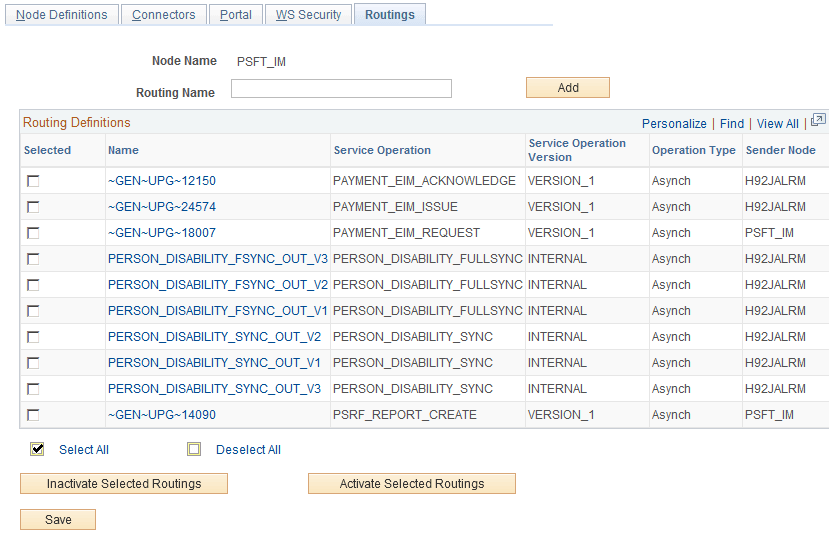
Routings are defined in PeopleTools, Integration Broker, Integration Setup, Services Operations, Routings. Alternatively, use PeopleTools, Integration Broker, Integration Setup, Routings to define routings. Refer to the Integration Broker PeopleBook for more details on how to set up the routings. Once the routings are set up properly, make sure to activate them. If using flat file architecture, make sure that TIME_DEVICE_XXXX service operations have both OutAsync and InAsync specified with a Status of Active. Flat files are generated by the local Node for each Flat File TCD Server. The location of output is defined on the TL Installation page and the TL General Settings page. |
Access the Node Definitions page.
This example illustrates the fields and controls on the Node Definitions page. You can find definitions for the fields and controls later on this page.
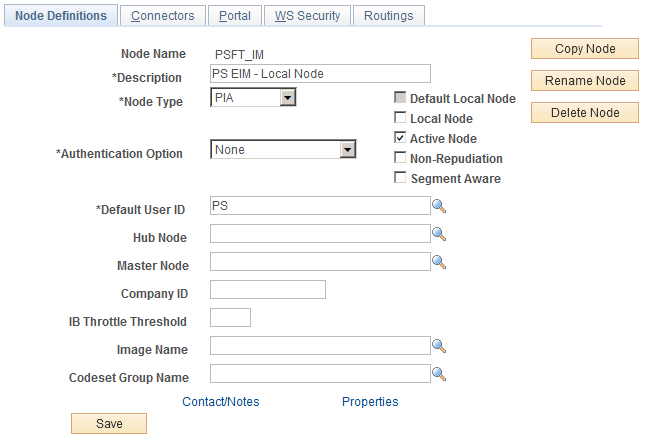
Access this page from Make sure that the Node Type is set to PIA (internal, local) and that you check both Local Node and Active Node.
Access the Connectors page.
This example illustrates the fields and controls on the Connectors page. You can find definitions for the fields and controls later on this page.
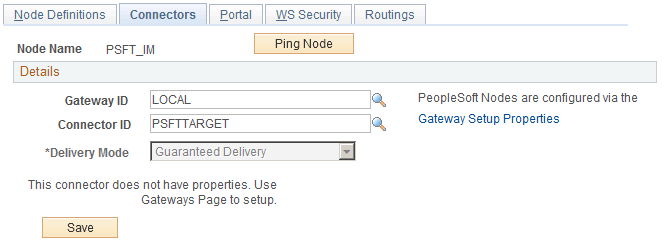
Make sure that you set Connector ID to PSFTTARGET as the local node always uses this value for the tool set.
Access the Routings page.
See PeopleTools 8.52: Integration Broker PeopleBook
This example illustrates the fields and controls on the Routings page (1 of 2). You can find definitions for the fields and controls later on this page.
This example illustrates the fields and controls on the Routings page (2 of 2). You can find definitions for the fields and controls later on this page.
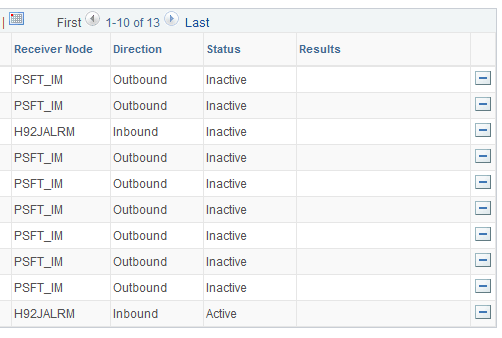
If using flat file architecture make sure that TIME_DEVICE_XXXX messages have both OutAsync and InAsync specified with a Status of Active. Flat files are generated by the local Node for each Flat File TCD Server. The location of output is defined on the TL Installation Page and the TL General Settings Page.
Defining the External TCD Nodes
This table provides the specific configuration details for this integration:
| Page | Configuration Specifics |
|---|---|
|
Node Definitions |
TCD Nodes are required only for XML messaging. Make sure that the Node Type is set to External and that you select Active Node. |
|
Connectors |
Make sure that you set Connector ID to either PSFT81TARGET or HTTPTARGET . Note: PST81TARGET is used for external TCD servers which are compliant with 8.1x or 8.2x PeopleTools. HTTPTARGET is used for TCD servers which can support 8.4x toolset documentation. Click Ping Node to access the Ping Node Results page. |
|
Routings |
Make sure to specify the Time_Device_ xxxx message as outsync and Elapsed and Punch messages as inasync. Make sure to specify outbound and inbound transactions for the external node. The routing type should be implicit. |
Access the Node Definitions page.
Defining the Gateway for the PeopleSoft System
Access the Gateways page.
The gateway for the Peoplesoft local node is typically http://server/PSIGW/PeopleSoftListeningConnector.
The gateway on TCD servers that do not support 8.4x Integration Broker is http://xtnt05.peoplesoft.com/PSIGW/PS81ListeningConnector. The gateway on TCD servers that do support 8.4x Integration Broker is http://server/PSIGW/PeopleSoftListeningConnector.
See the product documentation for PeopleTools PeopleSoft Integration Broker