Overview of the Time Administration Application Engine Processes
Time Administration, the core process in Time and Labor, produces payable time that is passed to other applications such as Payroll and Project Costing. It is critical that this process produces accurate results and successfully completes within a certain processing window. Time Administration is an iterative process that only processes records that need processing. Depending on the size of the population at your installation, you may need to configure Time Administration to run concurrently to reduce clock time in order to fit your processing window.
Time Administration is a complex process comprised of many Application Engine (AE) programs. The main driver for the Time Administration process is TL_TIMEADMIN. When invoked, TL_TIMEADMIN calls other Application Engine processes to perform various tasks. Most of these subprograms contain the prefix of TL_TA followed by a six-digit number starting from 000200 to 001300. Subprograms that do not contain a number have been added to increase performance.
This diagram illustrates the subprograms called by TL_TIMEADMIN
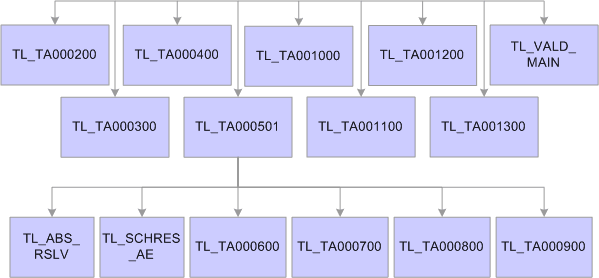
The following table lists the Application Engine processes associated with Time Administration and describes:
-
The function of each Application Engine.
-
Tables accessed during the Application Engine process.
-
Tables updated during the Application Engine process.
| Application Engine | Function | Tables Accessed/Updated |
|---|---|---|
|
TL_TIMEADMIN |
This is the main Time Administration driver program. It performs initialization tasks, calls other AE programs to perform various tasks, and performs finalization tasks. |
Note: The following table names listed ending with XX are temporary tables. You will need to replace XX with the correct temp table instance number before accessing them. Temp table instance number can be found in your AET log file or the Temp Tables tab of the Process Monitor while the process is running. |
|
TL_TA000200 |
|
Tables Accessed: TL_TR_STATUS – selects records with TA_STATUS of Y or X and EARLIEST_CHGDT <= Process Date. Tables Updated: TL_TA_TRLISTXX – contains a list of time reporters to be processed in subsequent steps of Time Administration. |
|
TL_TA000300 |
|
Tables Accessed:
Note: You can adjust the batch size (Max Employees In Rules Run) on the Installation Options page to increase or decrease the number of batches. Tables Updated: TL_TA_BATCH%XX – contains batches of time reporters. Note: There are many temp tables with the prefix TL_TA_BATCH that hold batch related data. TL_TR_STATUS – sets TA_STATUS to X for all time reporters being processed. Note: The Time Administration process deletes a batch when there is no reason to process the employees in the batch. The rows that are deleted from TL_TA_BATCH result in gaps in the table. If there still are high severity exceptions that are not resolved (from source TVP / TVE) and if theContinue with Exceptions check box is cleared in the Time Administration Options group box on the TL Installation page, TimeAdmin will remove those employees from the current batch. |
|
TL_TA000400 |
Creates rule maps – contains rules to be executed in priority order for each batch. |
Tables Accessed: TL_TA_BATCHXX – contains batches of time reporters. Tables Updated:
|
|
TL_TA000501 |
Calls TL_TRPROFILE – to create time reporter profiles. If Time and Labor is integrated with Global Payroll or Payroll for North America using Absence Management, or both, this step loads the Workgroup, PNA pay group and GP pay group attributes, including holiday configurations.
|
Tables Accessed: TL_TA_BATCH%XX – contains batches of time reporters. Tables Updated:
Note: TL_PROF_WRKXX can be used in custom rules to improve performance. |
|
TL_SCHRES_AE |
Tables Accessed: TL_PROF_WRK – contains time reporter data. Tables Updated: WRK_ADHOC_TAOXX |
|
|
TL_ABS_RSLV |
Tables Accessed:
Tables Updated:
|
|
|
TL_TA000600 |
Converts punch time into elapsed time by calculating duration between two consecutive punches. Applies day breaker options and applies pre-rule punch rounding. Before inserting schedule punch time into the punch match table, the system checks for absence data for the days. |
Tables Accessed:
Tables Updated: TL_MTCHD_1XX – contains matched punches. |
|
TL_TA000700 |
Load absences (if integrated). Creates intermediate payable time (IPT) from matched punches (created by TL_TA000600), and reported elapsed time. Scheduled time is only created for workgroups with exceptions. |
Tables Accessed:
Tables Updated: TL_IPT1XX– contains intermediate payable time data for all time reporters in the current batch. |
|
TL_TA000750 |
Processes attendance data. |
Tables Accessed:
Tables Updated:
|
|
TL_TA000850 |
Calls TL_TA_RULES to apply rules in the order specified on the rule program for each batch. |
Tables Accessed:
Tables Updated: TL_IPT1XX– contains intermediate payable time data for all time reporters in the current batch. |
|
TL_TA000900 |
|
Tables Accessed:
Tables Updated: TL_IPT1XX– contains intermediate payable time data for all time reporters in the current batch. |
|
TL_VALD_MAIN |
Post rule validation
|
Tables Accessed:
|
|
TL_TIMEADMIN.JB000 |
|
Table Accessed: GP_PI_GEN_DATA — contains processed absence Positive Inputs |
|
TL_TA001000 |
Creates offsets. Creates offsets for absence rows that are from Global Payroll only. Note: Payroll for North America processes offsets for absences created and passes negative absence rows into TL_PAYABLE_TIME. |
Tables Accessed:
Tables Updated:
|
|
TL_TA001100 |
|
Tables Accessed:
Tables Updated:
|
|
TL_TA001200 |
|
Tables Updated:
Note: TL_TA001200 is where Time Administration interacts with the AWE application. |
|
TL_TA001300 |
|
Tables Accessed:
Tables Updated: TL_TR_STATUS – contains an updated row for each time reporter enrolled in Time and Labor. |