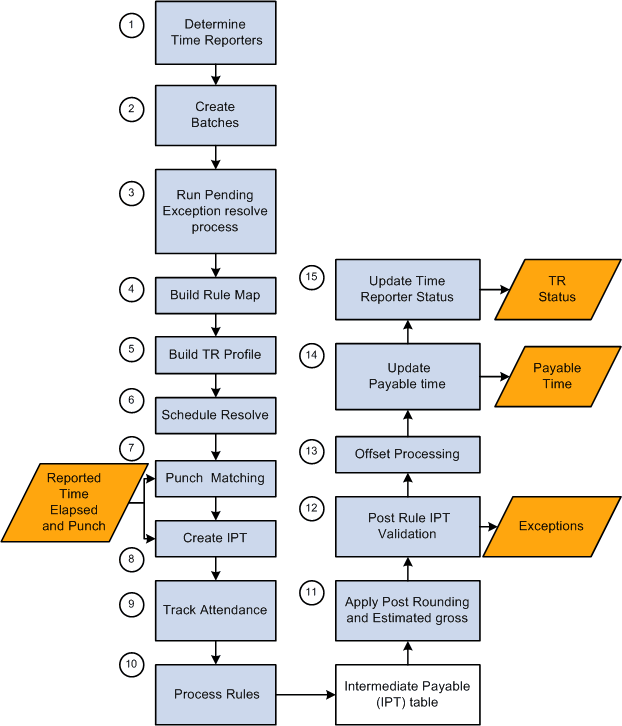
Understanding the Time Administration Process Flow
The batch process in Time Administration converts reported and scheduled time into payable time. It executes the rules you defined using Time and Labor's online tools, selects time reporters for processing, combines time reporters into batches, determines the period to process, and calculates prior period adjustments before passing time reporter data to your payroll system or other applications.
The programs that make up the batch process are listed in the following table in the order in which they are run:
| Program Name (Technical) | Function |
|---|---|
|
TL_TIMEADMIN |
Main Module |
|
TL_TA000200 |
Step 1: Determining Time Reporters to Process |
|
TL_TA000300 |
Step 2: Combining Time Reporters into Batches |
|
TL_TA000400 |
Step 4: Building the Rule Map |
|
TL_TA000501 |
Step 5: Batch Process Driver |
|
TL_ABS_RSVL |
Resolve Absence Data |
|
TL_TA000600 |
Step 8: Matching Punches |
|
TL_SCHRES_AE |
Schedule resolve callable routine. |
|
TL_TA000700 |
Step 9: Creating Intermediate Payable Time |
|
TL_TA000750 |
Step 10: Tracking Attendance |
|
TL_TA000850 |
Step 11: Apply Rounding |
|
TL_TA_RULES |
Rules Processing |
|
TL_TA000900 |
Step 12: Validate Data and Perform Estimated Gross |
|
TL_VALD_MAIN |
Step 13: Time Validation |
|
TL_TA001000 |
Step 14: Processing Offsets |
|
TL_TA001100 |
Step 15: Updating Payable Time |
|
TL_TA001200 |
Approvals and Notifications |
|
TL_TA001300 |
Step 16: Updating TR Status |
The following sections present detailed information about each of these steps.
This diagram illustrates the Time Administration process flow