Understanding the Sequence for Defining Task Functionality
This flowchart illustrates the sequence of steps necessary to define your task reporting requirements. We discuss each of these steps briefly in this section.
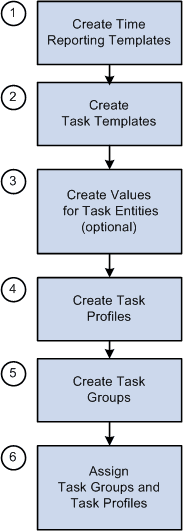
To define task reporting requirements for your organization:
-
Create time reporting templates.
Use the Time Reporting Template page to create templates for elapsed time and punch time reporting. On the template, select the Task Profile or Task Template check box to indicate the type of task reporting for which the template is designed. You must create time reporting templates before you can create taskgroups.
-
Create task templates.
Use the Task Template page to select the task entities that you want to appear on the time reporting pages or that you want your time collection devices (TCDs) to capture from time reporters.
You can create task templates before or after you create values for task entities.
-
Create values for task entities (optional).
If you want employees to report time by customer, product, activity, task, project, and/or up to five user-defined task categories, define the set of valid values that can be used for time reporting. For example, if you want to account for time by customer, set up a code for each customer.
If Project Costing is integrated with Time and Labor, the Project Costing application uses Integration Broker technology to publish the valid values for additional task entities.
-
Create task profiles.
Use the Task Profile page to select the values for the task entities you selected on the task template. Also indicate whether time is to be allocated across tasks equally, allocated by percentage, or allocated by quantity.
-
Create taskgroups.
Use the Taskgroup page to identify the default time reporting templates, task template, and task profile(s) that are valid for time reporters with the same task reporting requirements.
Before you can define taskgroups, you must create time reporting templates for elapsed and punch time reporting.
-
Assign taskgroup and task profiles.
-
Assign a taskgroup to each time reporter via the Create Time Reporter Data page or Maintain Time Reporter Data page. You can also assign a task profile to each time reporter. The task profile you select will take precedence over the default task profile assigned to the time reporter's taskgroup.
-
If you're using time collection devices, assign the appropriate taskgroups to each TCD via the TCD Setup page. The taskgroup determines what profiles and templates will be available to send to the TCD. You can also specify whether to send task profiles, task templates, and/or task values to the TCD.
-
Note:
Before you begin to define task templates, task profiles, and taskgroups, spend some time analyzing your organization's task-reporting requirements. Determine which time reporters share the same or similar reporting requirements, perhaps based on the kind of work they perform, and what those specific requirements are. One taskgroup can include both elapsed and punch-time employees—employees and non-employees—as long as the same task entities apply to everyone in the taskgroup.
Related Topics