2.14.6 Activating EO_PE_RSS Service Operation Routing
To activate the EO_PE_RSS service operation routing:
-
Select PeopleTools, Integration Broker, Integration Setup, Service Operation Definitions.
The Service Operations search page appears.
-
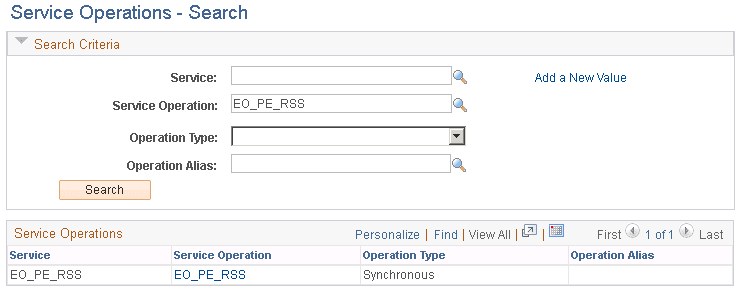
On the Service Operations search - Find Service Operation page, in the Service Operation field, enter EO_PE_RSS.
-
In the search results grid, click the EO_PE_RSS link to access the EO_PE_RSS service operation of the EO_PE_RSS service, as shown in the following example:
Figure 2-18 Service Operations - Find Service Operation search page
-
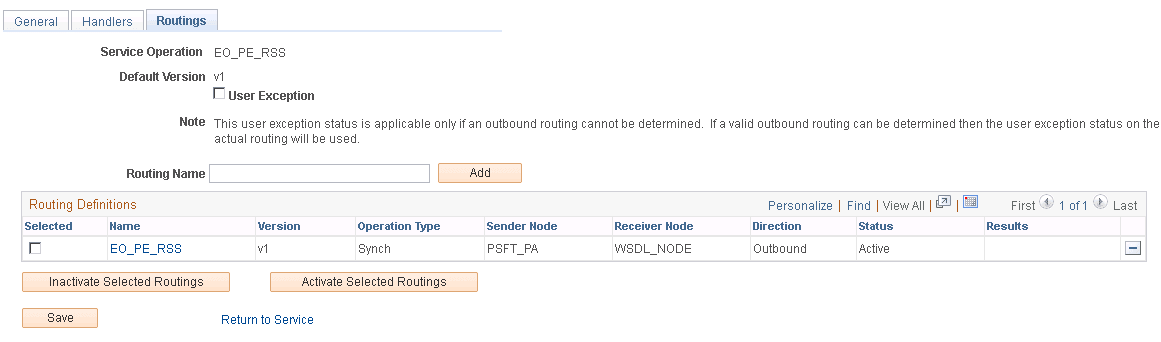
On the Service Operations General page for EO_PE_RSS, select the Routings tab to access the Routings page for EO_PE_RSS, as shown in the following example:
Figure 2-19 Service Operations - Routings page for EO_PE_RSS
-
Select the Selected check box to pick the routing.
-
Click the Activate Selected Routings button.
-
Click Save.
-
Select the General tab.
-
Select the Active check box, if it is not checked.
-
Click Save.