2.15.5 Deploying and Indexing the Search Definitions that Oracle Delivers
To deploy and index Search Definitions using Search Administrator WorkCenter:
-
Select Portal Administration, Search Administration.
-
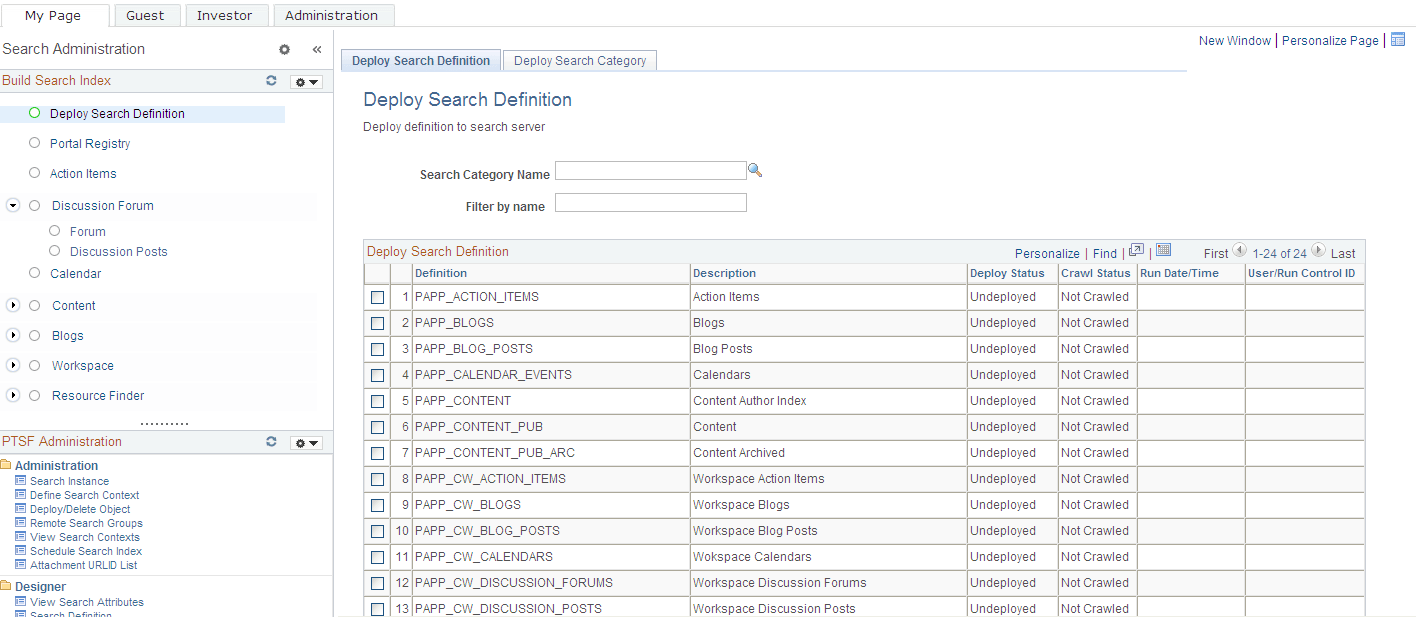
Select Deploy Search Definition.
The Deploy Search Definition page appears, as shown in this example:
Figure 2-21 Deploy Search Definition page
-
Select the check boxes for Search Definitions to be deployed and click Deploy.
Note:
Search Categories configured as Search groups can only be deployed if all the Search Definitions or Categories under it are deployed.
To build the Search Indexes:
-
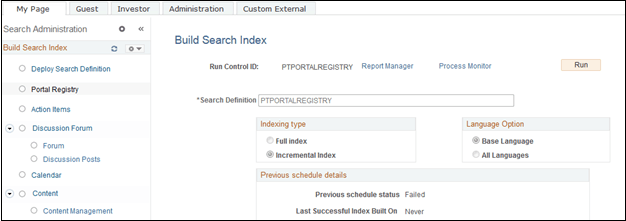
Select Portal Registry.
-
Click Run.
-
Click OK on the run control page, as shown in this example:
Figure 2-22 Build Search Index for Portal Registry
Note:
Repeat the above steps for all the other Search definitions to build the indexes.
Note:
Alternatively, Search Definitions and Search Categories can be deployed and indexed using Search Admin Activity Guide.
See PeopleTools: Search Technology, “Administering PeopleSoft Search Framework,” Administering Search Definitions and Search Categories.
See PeopleTools: Search Technology, “Administering PeopleSoft Search Framework,” Working with Search Indexes.