Registering Action Types and Action Type Bundles
This section discusses how to register action types and action type bundles.
Pages Used to Register Action Types and Action Type Bundles
| Page Name | Definition Name | Usage |
|---|---|---|
|
EOCF_ACTN_TYPE_REG |
Register an action type. |
|
|
EOCF_ACT_TYP_EVNTS |
Specify action type triggers. |
|
|
EOCF_ACTION_BUNDLE |
Register action type bundles. |
Register Action Type Page
Use the Register Action Type page (EOCF_ACTN_TYPE_REG) to register an action type.
Navigation:
This example illustrates the fields and controls on the Register Action Type page. You can find definitions for the fields and controls later on this page.
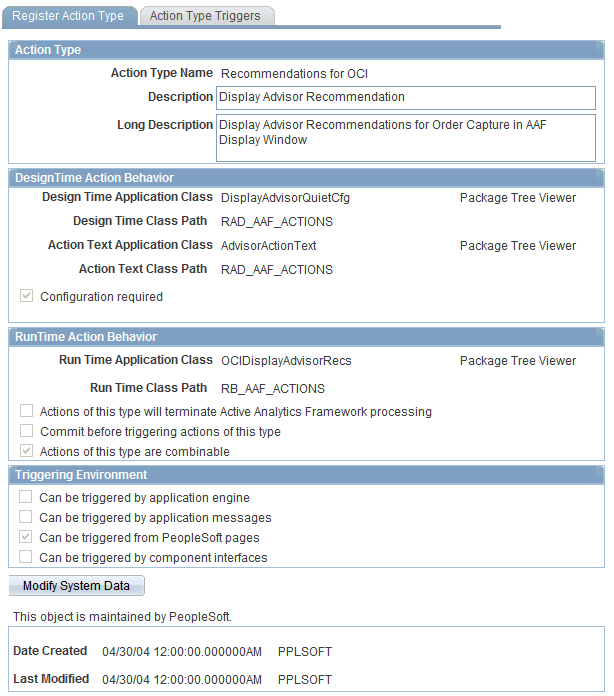
| Field or Control | Description |
|---|---|
|
Action Type Name |
The name of a class of similar actions. |
|
DesignTime Action Behavior |
Specify the design time details of the action type. When you add actions of this action type in a policy, these design time specifications are used to present the action type configuration page and store the configuration. |
|
RunTime Action Behavior |
Specify the runtime details of the action type. The application class details specified here are executed at runtime to trigger actions of this type. |
|
Triggering Environment |
Specify the triggering environments to be supported for this action type. |
Action Type Triggers Page
Use the Action Type Triggers page (EOCF_ACT_TYP_EVNTS) to specify action type triggers.
Navigation:
This example illustrates the fields and controls on the Action Type Triggers page . You can find definitions for the fields and controls later on this page.
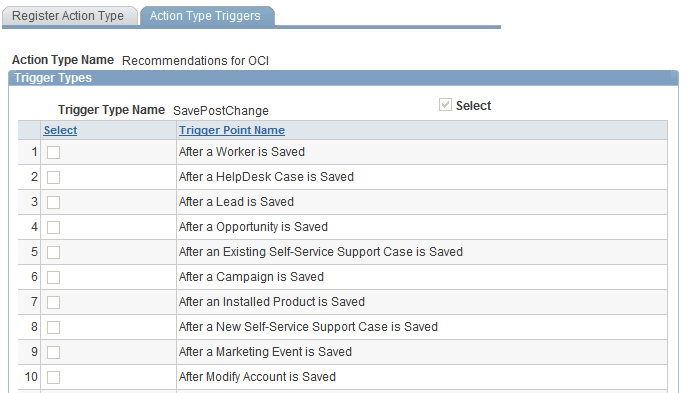
Select the appropriate check boxes to associate this action type with listed trigger types and trigger points.
-
Selecting a trigger type makes this action type available for the selected trigger type.
-
One or more trigger points can be selected only if the corresponding trigger type is selected.
Register Action Type Bundle Page
Use the Register Action Type Bundle page (EOCF_ACTION_BUNDLE) to register action type bundles.
Navigation:
This example illustrates the fields and controls on the Register Action Type Bundle page. You can find definitions for the fields and controls later on this page.
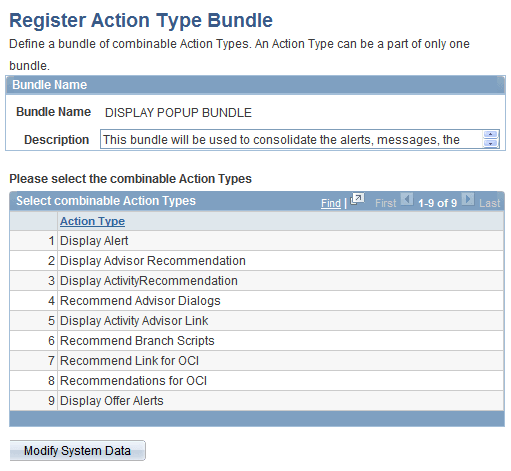
Enter a name and description for this action type bundle. Select the action types that can be combined from the drop-down list box in each row.