Integration with the PeopleTools Push Notification Framework
Notification Composer employs PeopleTools 8.59 Push Notification Framework as part of its framework.
The PeopleTools Push Notification Framework provides the underlying architecture for Notification Composer, such as the Notification Server layer, Web server layer, and Browser layer.
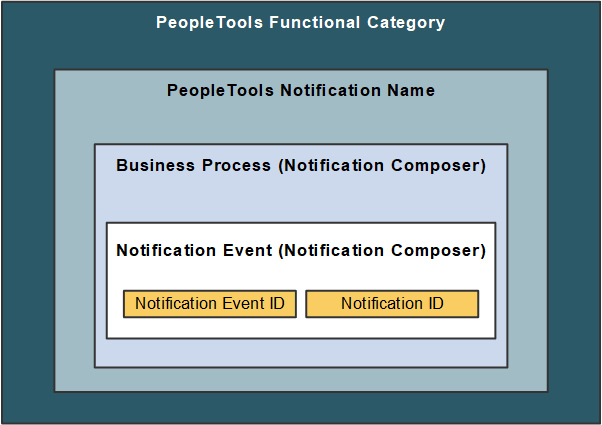
As part of Notification Composer integration with the PeopleTools Push Notification Framework, the following framework and data classifications are used to organize and process notifications within Notification Composer.
Framework and data classifications used to organize and process notifications within Notification Composer.
-
Functional Category: Logical grouping of PeopleTools notification names. Functional Category is defined within PeopleTools Push Notification Framework.
-
PeopleTools Notification Name: The PeopleTools notification name is defined within the PeopleTools Push Notification Framework and controls the delivery channel preferences and user personalization access.
-
Business Process: A logical grouping of Notification Events.
-
Notification Event: Events that occur within the context of a PeopleSoft application that trigger notifications such as hiring an employee, adopting a baby, or submitting expenses. Maps to the Notification ID.
-
Notification Event ID: Defines the relationship between the Notification Event and the Notification ID. Specifically, the Notification Event ID defines the Notification ID that the Notification Event uses to send notifications. You cannot modify delivered Notification Event IDs, only change the notification ID associated with it.
-
Notification ID: Identifies notification information, such as PeopleTools notification, notification text, associated user list information, and so forth. Oracle PeopleSoft recommends you do not modify delivered Notification IDs, but you can clone the notification and then change the ID.
Note:
Notification Composer requires PeopleTools 8.59.19 or higher.
For more information about the PeopleTools Push Notification Framework, see the topic 'Administering Notifications' in the PeopleTools Fluid User Interface Developer’s Guide.
Example: Notification Composer Data Classifications within Benefit Details
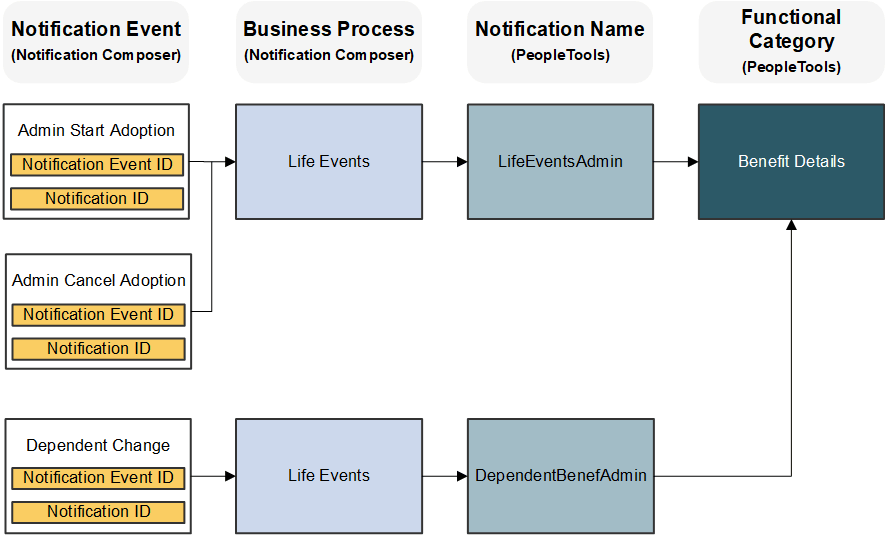
The following example uses Benefit Details notification information to demonstrate how Notification Composer data classifications and IDs are used to organize notification data.
Benefit Details example to demonstrate how Notification Composer data classifications and IDs are used to organize notification data.
Understanding How the PeopleTools Notification Configuration Impacts Notification Delivery
With the PeopleTools Push Notification Framework providing the foundation for Notification Composer, the following PeopleTools pages play an important role in whether users receive a notification:
-
Global Settings page: This page allows you to manage system-wide settings for push notifications, including enabling in-app, email, and text notifications.
-
(Notification) Add page: This page includes the Enable by Default option, which allows you to enable the notification type for all users by default. The page also includes the Allow Personalization option, which enables you to specify whether end users can personalize the notification using the My Preference - Notification page.
-
My Preferences - Notifications: This page allows end users the ability to personalize how they wish to receive notifications from the PeopleSoft system.
The following table provides a guide as to whether a user receives a notification based on the aforementioned PeopleTools notification configuration.
| Enable by Default? | Allow Personalization? | My Preferences? | Notification Sent? |
|---|---|---|---|
|
Yes |
No |
Not Applicable |
Yes |
|
Yes |
Yes |
Not specified by user |
Yes |
|
Yes |
Yes |
Yes |
Yes |
|
Yes |
Yes |
No |
No |
|
No |
No |
Not Applicable |
No |
|
No |
Yes |
Not specified by user |
No |
|
No |
Yes |
No |
No |
|
No |
Yes |
Yes |
Yes |
For more information about these PeopleTools Notification settings, see the topic 'Administering Notifications' in the PeopleTools Fluid User Interface Developer’s Guide.