Understanding Notification Composer
PeopleSoft Notification Composer provides a centralized framework to create and manage all of your notifications within PeopleSoft applications. Notifications are used in business processes to notify participants of tasks that have been completed or require action, such as approvals.
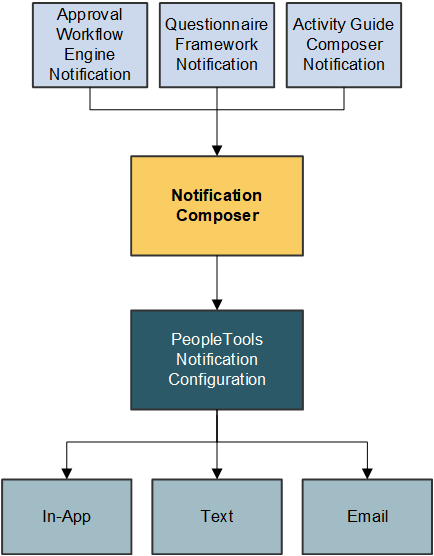
Notification Composer streamlines multiple notification methods and frameworks into a single approach, which simplifies notification setup, creation, and maintenance. For example, Notification Composer consolidates Approval Workflow, Activity Guide, Questionnaire Framework, and Forms and Approval Builder notifications under one framework.
With a centralized notification framework and integration with the PeopleTools Push Notification Framework, Notification Composer provides consistency across notifications, eliminates duplicate notifications, and allows users to specify the delivery method for notifications, including email, in-app, or text.
Note:
Notification Composer is currently supported in FSCM, HCM, ELM, and CRM.
As of HCM Update Image 53, ELM Update Image 25, CRM Update Image 23, and FSCM Update Image 55, Notification Composer supports the creation and delivery of notifications for the landing page. For more information on how to configure notifications for the landing page, see Creating and Managing Notifications with Notification Composer.
As of FSCM Update Image 52, HCM Update Image 51, ELM Update Image 25, and CRM Update Image 23, Notification Composer works with Page and Field Configurator to notify specific users when Change Tracking is the Configuration Type in Page and Field Configurator. For information about how to set this up in Page and Field Configurator, see Tracking Changes with Page and Field Configurator.
Notification Composer Architecture
Built-In Flexibility
Notification Composer is fully configurable and provides the ability to enable, disable, or override individual notifications at any time.
In addition, Notification Composer provides built-in flexibility for configuring notifications:
-
Group related notifications: You can organize and group related notifications using Business Process classification.
-
PeopleTools integration: You can associate PeopleTools notification names with Notification Composer notifications to control delivery channel preferences and user personalization options.
-
Configurable message source: You can specify whether you want an email, text, or in-app notification to use custom text, email templates, or message catalog.
-
User lists: You can specify user lists to define notification recipients for your notifications. User lists can be defined using roles, role queries, SQL definition, and application classes.
-
Notification handler: You can define a custom handler for sending notifications. A notification handler provides a framework for managing and sending various types of notifications, such as email notifications, text notifications, and so forth.
-
Event mapping: You can create a custom notification trigger using Event Mapping functionality. Event Mapping functionality allows you to define your own business logic to be executed when specific events occur within PeopleSoft applications. These events can be triggered by user actions or other predefined conditions.
-
Bind variables: You can associate bind variables with email, text, or in-app notifications. A bind variable is a placeholder used to represent a value in a SQL statement. Bind variables enable you to insert variable text into the notification messages. For example, you can add a bind variable for employee name within the message text. When the notification is sent to a group of employees, each employee has their own name appear in the message text.