Understanding Notification Publisher
Notification Publisher provides users the ability to compose and send notifications to individuals or groups of recipients.
Note:
Notification Publisher requires PeopleTools release 8.60 or later. For Notification Publisher with landing page support, the minimum PeopleTools release required is 8.62.
Notification Publisher (with landing page support) is available starting with HCM Update Image 53, ELM Update Image 25, CRM Update Image 23, and FSCM Update Image 55.
The Notification Publisher framework supports notifications in the form of:
-
In-app notifications that can appear:
-
On the Alerts or Actions tab of the Notifications panel.
-
(If landing page is used, which requires PeopleTools 8.62 or higher) In a specified dynamic section on the landing page, such as Suggestions or Announcements.
Note:
The system sends in-app notifications using the setup of the associated notification event from Notification Composer.
-
-
Announcements that can appear:
-
(If landing page is not used) On the Announcements tile that is displayed on a fluid homepage, or
Note:
Notifications are published on the Announcements tile if Announcement or Announcement and Email is selected as the delivery method on the Publish Notification Page.
-
(If landing page is used) In a section on the landing page.
Enterprise Components provides two announcement-specific sections that can be added to the landing page, Banner Announcement and Announcements.
To publish an announcement in the Banner Announcement section, select the Banner Announcement category on the on the Publish Notification Page.
To publish announcements in the Announcements section, select a category that is associated with a notification event configured for notifications to be displayed in the Announcements section.
See Also Viewing Announcements.
-
-
Email messages that are delivered to recipients’ inboxes.
Notification Publisher allows users to compose and send notifications:
-
That are standalone on the Publish Notification Page. From this page, more options are available and notifications can be sent immediately, at a scheduled date, or as recurring events.
-
From an application component that has implemented Notification Publisher.
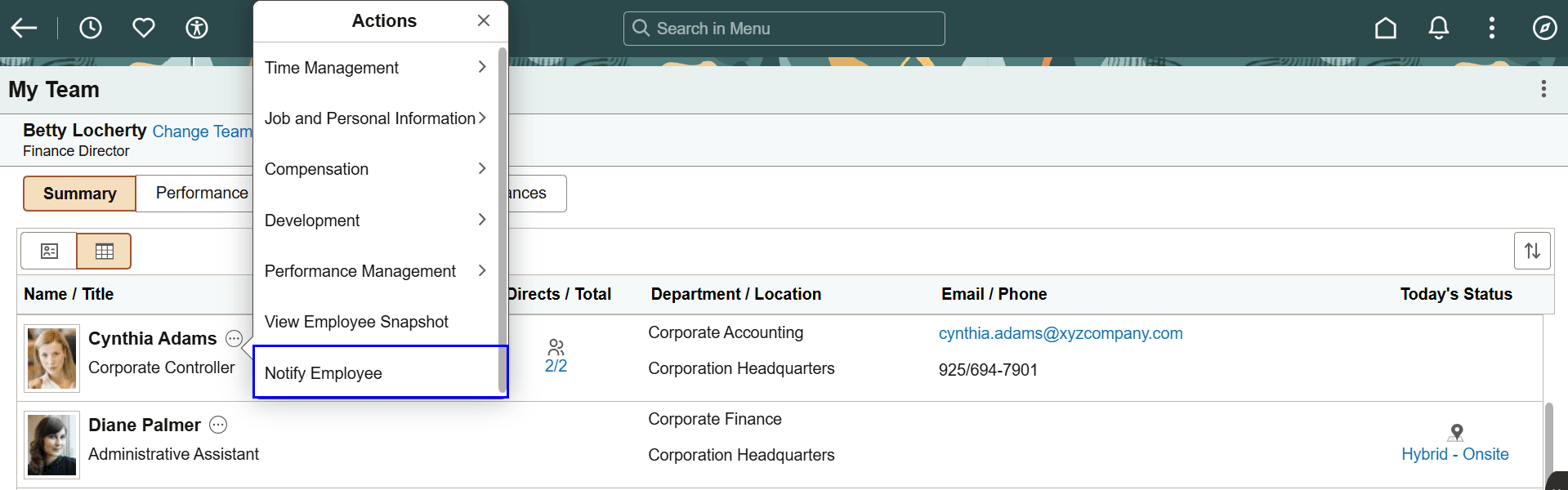
For example, this notification feature is available as a related action on the My Team page in HCM that allows managers to notify employees. Selecting the notify action launches a modal window from where the manager composes and sends the notification. This page is a simplified version of the Publish Notification Page and does not support the same options as the other page, for instance, notifications can only be sent immediately.
This image displays the related action for sending notifications on the My Team page using Notification Publisher.
This feature is also available in HCM WorkCenters in the form of a link on the left panel or related action.
Video: Image Highlights, PeopleSoft HCM Update Image 53: Notification Publisher