View Reference Page — Component/Page Tab
Use the Component/Page (EODP_VIEW_REF_FL) tab to view the references on Record Field References in Components and Pages.
Note:
Update References and Refresh References don't overwrite Data Privacy Attributes set in Component / Page References.
Navigation:
This example illustrates the fields and controls on the Component/Page tab.
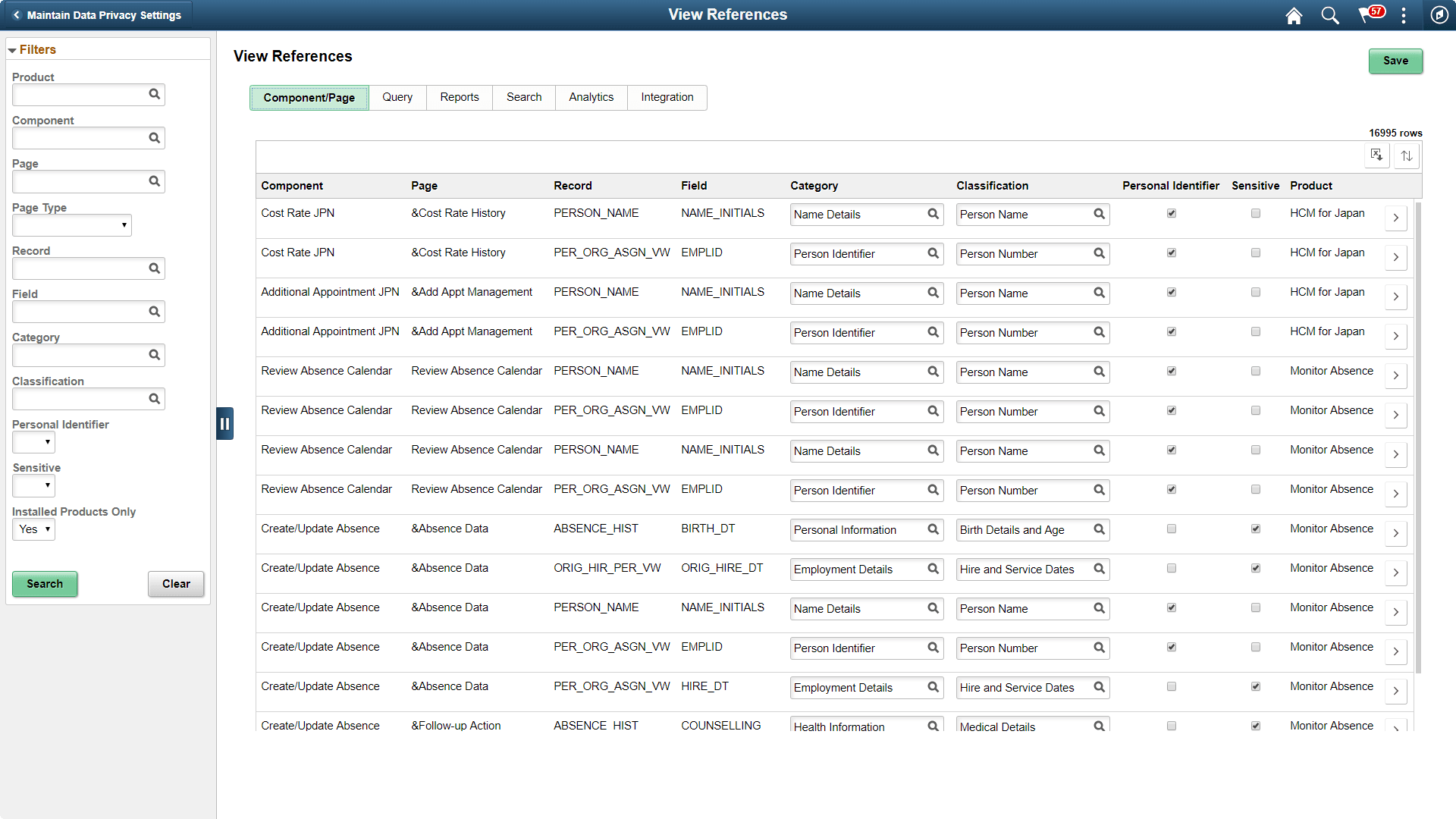
The left panel have Filters listed as follows:
-
Product
-
Component
-
Page
-
Page Type
-
Record
-
Field
-
Category
-
Classification
-
Personal Identifier
-
Sensitive
-
Installed Products Only
Page Type has three options:
-
Search: Show references of Record Fields in Component Search Records. This reference is displayed only if the Record field is a Key / Search Key / Alternate Search Key / List Box Item in the Search Record for the Component.
-
Secondary/ Popup: Show references in Secondary Page or Popup page. Component Name is blank for this Page type.
-
Standard: Show references in Standard pages.
| Field or Control | Description |
|---|---|
|
|
Select to open the Component Page Details for Standard page. |
