Data Maintenance Page
Use the Data Maintenance page (EO_EIP_CTL_SETUP1) to set up the Error Handling utility and correct message errors.
Navigation:
This example illustrates the fields and controls on the Data Maintenance page. You can find definitions for the fields and controls later on this page.
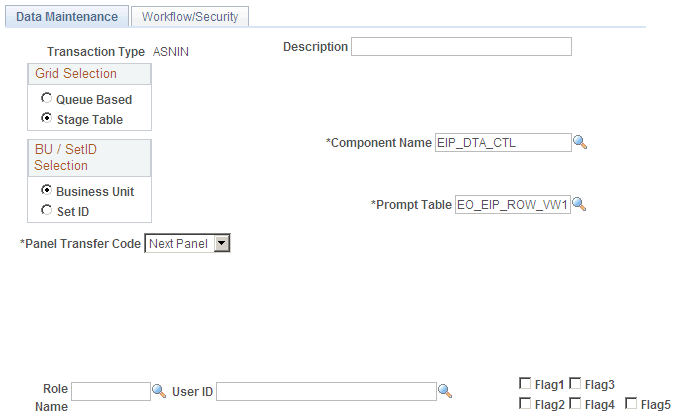
Use this page to set up the Error Handling utility and correct message errors.
| Field or Control | Description |
|---|---|
|
Queue Based and Stage Table |
PeopleTools messages are queue-based; bulk data or application data is usually staged. |
|
Business Unit and SetID |
Select a business unit or setID on which to base the data. |
|
Component Name |
Select the name of the component for accessing the Error Handling/Data Maintenance page (EO_EIP_CTL_MAINT). This is the component that the user opens for error-correction activities. You should select EIP_DTA_CTL. This component uses the same fonts and images for all incoming data maintenance or error-correction activities within the PeopleSoft system for non-real-time integration. |
|
Prompt Table |
Follow the navigation path to use the Error Handling utility, and select a prompt table for the data maintenance program (EIP_PROGRAM). The PeopleSoft system includes a common error handling menu structure that points to the main component EIP_DTA_CTL. Based on user privileges, the Error Handling utility prompts from a selected list of data maintenance programs. |
|
Panel Transfer Code |
Select Next Panel to receive a transfer panel name prompt, which gives you a selection of pages that are part of the main data maintenance component that you selected in the Main Data Maint Panel Group field. Select one page. Selecting either Transfer or Modal opens additional fields. |
|
Role Name |
Select a name to set up workflow notification and to notify all role users listed. |
|
User ID |
Select to notify only specific role users. |
|
Flag1, Flag2, Flag3, Flag4 and Flag5 |
Users often do not see these check boxes. Application developers use them for extra coding flexibility. Developers must create documentation for these check boxes to use them. |