(Optional) Setting Up Directory Authentication
This section discusses how to use map authentication and view user properties.
For information about setting up authentication servers, user profile maps, and role membership rules, refer to the following documentation.
Pages Used to Set Up Directory Authentication
| Page Name | Definition Name | Usage |
|---|---|---|
|
DSSECMAPMAIN |
Create a mapping for the directory that the system relies on for authenticating users. |
|
|
DSUSRPRFLMANMAP |
Specify the attributes required for sign-in. You can have the system retrieve these mandatory values from the directory server, or you can enter default values. |
|
|
DSUSRPRFLOPTMAP |
Specify optional user properties to store in and retrieve from the directory. You can specify general, permission list, and workflow attributes. All these attributes appear in the User Profile component. |
Authentication Page
Use the Authentication page (DSSECMAPMAIN) to create a mapping for the directory that the system relies on for authenticating users.
Navigation:
This example illustrates the fields and controls on the Authentication page. You can find definitions for the fields and controls later on this page.
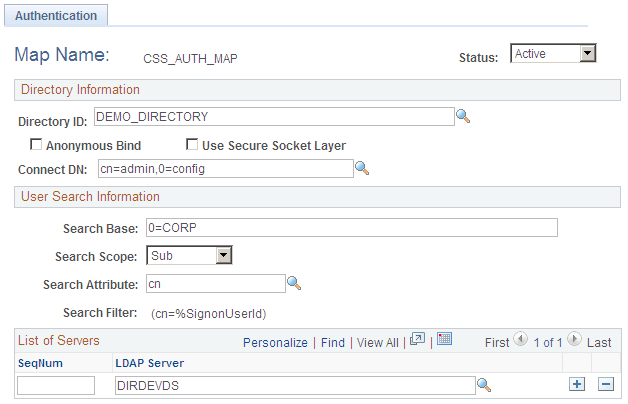
Use this page to create a mapping for the directory that the system relies on for authenticating users.
| Field or Control | Description |
|---|---|
|
Anonymous Bind |
If directory data required for authentication and user profile maintenance is visible to an anonymous connection, you can select this check box. |
|
Use Secure Socket Layer |
Select if you are using SSL between the PeopleSoft system and the directory server. |
Mandatory User Properties Page
Use the Mandatory User Properties page (DSUSRPRFLMANMAP) to specify the attributes required for sign-in.
You can have the system retrieve these mandatory values from the directory server, or you can enter default values.
Navigation:
This example illustrates the fields and controls on the Mandatory User Properties page. You can find definitions for the fields and controls later on this page.
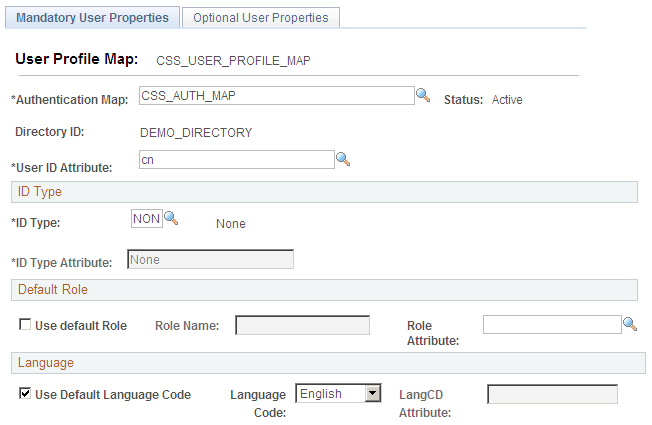
Select Authentication Map and set check boxes and field values as needed.
Optional User Properties Page
Use the Optional User Properties page (DSUSRPRFLOPTMAP) to specify optional user properties to store in and retrieve from the directory.
You can specify general, permission list, and workflow attributes. All these attributes appear in the User Profile component.
Navigation:
This example illustrates the fields and controls on the Optional User Properties page. You can find definitions for the fields and controls later on this page.

Use the Mandatory User Properties page or the Optional User Properties page to specify the attributes required for sign-in. You can have the system retrieve these mandatory values from the directory server, or you can enter default values.
The default shows the Attribute Name field available. If you select the Use Constant Value check box, the Constant Value field becomes available instead.