Changing Circular Formula and Circular System Options
Use the Analytic Model - General tab to change circular formula and circular system options.
Navigation:
-
Select to access PeopleSoft Application Designer.
-
After signing in to the PeopleSoft Application Designer, open an analytic model definition.
-
Select the name of the analytic model in the part browser.
This example illustrates the fields and controls on the Analytic Model - General tab. Definitions for the fields and controls appear following the example.
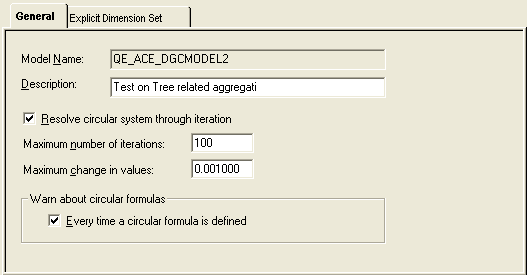
| Field or Control | Description |
|---|---|
|
Description |
Enter a description of the analytic model. Note: This field pertains to the analytic model as a whole, not to circular formula options. |
|
Resolve circular system through iteration |
Select to attempt to resolve all of an analytic model's circular systems through iteration. By default, this option is disabled. |
|
Maximum number of iterations |
Enter the number of iterations in which the analytic calculation engine is to resolve circular systems. By default, the maximum number of iterations is 100. If the analytic calculation engine cannot resolve a circular system during this number of iterations, the analytic calculation engine returns an error. Note: You must select the Resolve circular system through iteration check box to activate this option. |
|
Maximum change in values |
Enter the maximum change in values. By default, the maximum change in values is 0.001000. A circular system is considered to be resolved when the values of its cells do not change more than the specified maximum change. If you enter a smaller value, the solution is more accurate but may require a longer calculation time. If you enter a larger value, the solution not as accurate but requires a shorter calculation time. Note: You must enable the Resolve circular system through iteration check box to activate this option. |
|
Warn about circular formulas |
Every time a circular formula is defined: Select for the analytic calculation engine to provide a circular formula warning every time a circular formula is defined. |