Copying Analytic Instances
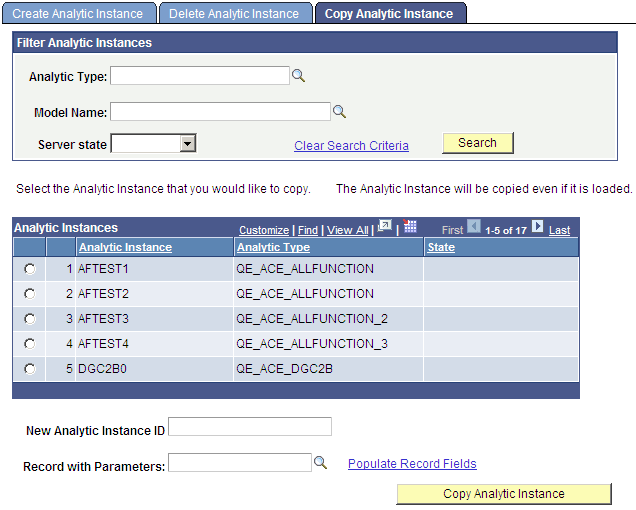
You use the Copy Analytic Instance page (PTACECPYINST) to specify search criteria to filter the display of returned analytic instances based on a combination of analytic type, model name, and server state; and then copy the selected analytic instance and its associated data.
Navigation:
This example illustrates the fields and controls on the Copy Analytic Instance page. Definitions for the fields and controls appear following the example.
| Field or Control | Description |
|---|---|
|
Analytic Type |
Look up and select the analytic type upon which the analytic instance is based. |
|
Model Name |
Look up and select the analytic model upon which the analytic instance is based. |
|
Server State |
Select one of the following:
|
|
Clear Search Criteria |
Click to delete any current search criteria so you can begin a search from scratch. |
|
Search |
Click to display all analytic instances that meet the specified search criteria. Select one of the displayed analytic instances as the source instance to copy. |
|
New Analytic Instance ID |
Enter a name for the new analytic instance; this analytic instance will be a copy of the selected source instance. |
|
Record with Parameters |
Look up and select parameters to be passed to the application class method that will copy the source analytic instance. Click the lookup button to display a list of records. Select a record, the first row of which will consist of parameters that you want to pass to the application class copy method. Selecting any record generates a populated standalone record. |
|
Populate Record Fields |
Displays a secondary page that lets you populate the fields of the standalone record; the values of these fields will serve as parameters passed into the application class copy method. |
|
Copy Analytic Instance |
Copy the selected analytic instance and its associated data. If a tree is attached to the selected analytic instance, all tree data is also copied to the new analytic instance. Note: The analytic instance data and tree data are copied only if the record with parameters that you specified is populated with the source analytic instance ID. |