Defining Additional Cube Collection Dimension Properties
This topic discusses how to:
-
Set additional cube collection dimension properties.
-
View additional cube collection dimension properties.
Setting Additional Cube Collection Dimension Properties
To set additional cube collection dimension properties:
-
Access PeopleSoft Application Designer by selecting .
-
After signing in to the PeopleSoft Application Designer, open an analytic model definition.
-
Select the cube collection that contains the dimensions whose properties you want to set, and then select the Dimensions tab.
-
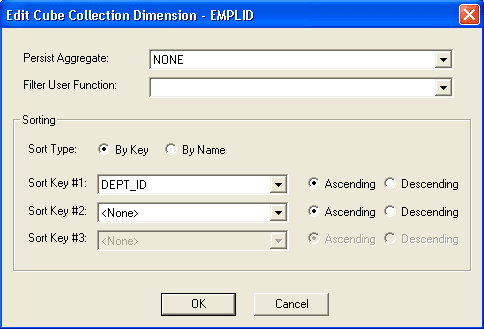
Double-click any of the cells in the row of a dimension to access the Edit Cube Collection Dimension dialog box.
This is an example of the Edit Cube Collection Dimension dialog box.
| Field or Control | Description |
|---|---|
|
Persist Aggregate |
Select whether to persist the dimension's aggregate values to the database. Aggregate data is persisted to the aggregate record that you select on the General tab.
|
|
Filter User Function |
Select a filter user function to apply to the dimension. Select None if you do not want to apply a filter user function to the dimension. |
|
Sort Type |
By Name: Select to sort the dimension member values by name. By Key: Select to sort the dimension member values by data cube values. Note: You can only select from the fields that are mapped to data cubes. |
|
Sort Key #1 |
If the By Key option is selected, select the first data cube name by which you would like to sort the dimension member values. Select to sort the dimension's key values in ascending or descending order. |
|
Sort Key #2 |
If the By Key option is selected, select the second data cube name by which you would like to sort the dimension member values. Select to sort the dimension's key values in ascending or descending order. |
|
Sort Key #3 |
If the By Key option is selected, select the third data cube name by which you would like to sort the dimension member values. Select to sort the dimension's key values in ascending or descending order. |
Viewing Additional Cube Collection Dimension Properties
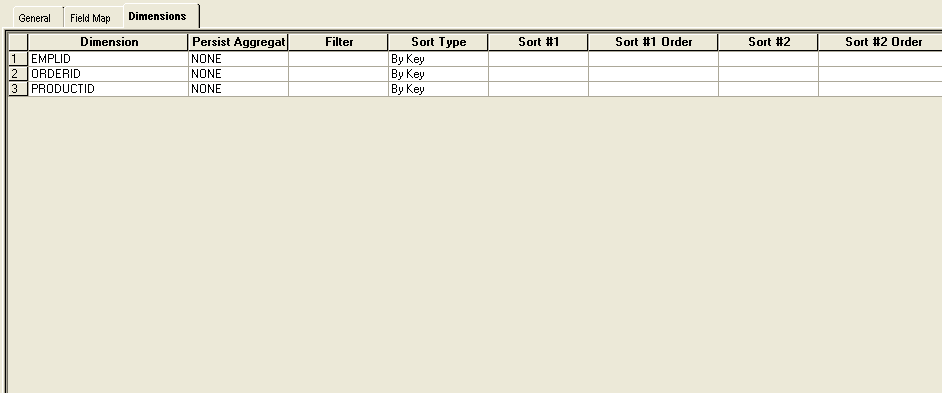
The Dimensions tab displays additional properties that you have set for the dimensions in a cube collection.
To view additional cube collection dimension properties:
-
Access PeopleSoft Application Designer by selecting .
-
After signing in to the PeopleSoft Application Designer, open an analytic model definition.
-
Select the cube collection that contains the dimensions whose properties you want to view, and then select the Dimensions tab.
This is an example of the Cube Collections - Dimensions tab.
| Field or Control | Description |
|---|---|
|
Dimension |
Displays the name of the dimension. |
|
Persist Aggregate |
Displays any aggregates that are persisted for the dimension. |
|
Filter |
Displays the filter formula that is applied to the dimension. |
|
Sort Type |
Displays the sort type that is applied to the dimension's values. |
|
Sort #1 |
If the dimension values are sorted by key, displays the first key field by which the dimension member values are sorted. |
|
Sort #1 Order |
If the dimension member values are sorted by the first key, displays whether the sort is by ascending or descending order. |
|
Sort #2 |
If the dimension member values are sorted by key, displays the second key field by which the dimension member values are sorted. |
|
Sort #2 Order |
If the dimension member values are sorted by a second key, displays whether the sort is by ascending or descending order. |
|
Sort #3 |
If the dimension member values are sorted by key, displays the third key field by which the dimension member values are sorted. |
|
Sort #3 Order |
If the dimension member values are sorted by key, displays whether the sort is by ascending or descending order. |