Mapping Data Cubes and Dimensions to Fields
To map data cubes and dimensions to fields:
-
Access PeopleSoft Application Designer by selecting .
-
After signing in to the PeopleSoft Application Designer, open an analytic model definition.
-
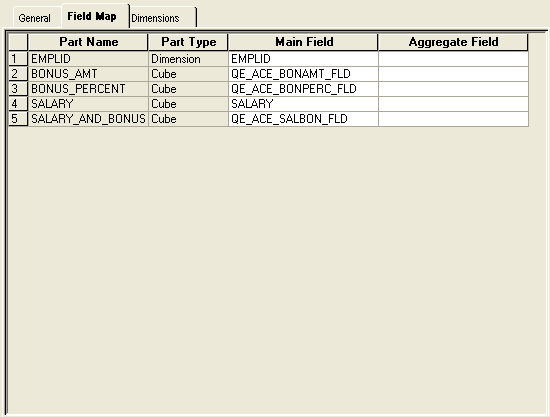
Select the cube collection that contains the data cubes and dimensions that you want to map, and then select the Field Map tab.
This is an example of the Cube Collections - Field Map tab.
| Field or Control | Description |
|---|---|
|
Part Name |
Displays the name of the data cube or dimension to which you map fields. Note: You can map a field to only one data cube or dimension. |
|
Part Type |
Displays whether the part to which you map fields is a data cube or dimension. |
|
Main Field |
Select a main field to map to the data cube or dimension. Note: You can map a data cube or dimension to one field within one record. After you have mapped a data cube or dimension to a particular record field, you cannot use that record field in another mapping. You can, however, reuse the same field if that field is from a different record. When mapping dimensions and data cubes, you may want to map dimensions to the key fields in the main record and data cubes to the non-key fields in the main record. The PeopleSoft system, however, does enable you to map dimensions to non-key and data cubes to key fields. To perform the most appropriate mapping, you must have a deeper understanding of the relationship between data cubes and dimensions. |
|
Aggregate Field |
Select a field to store the cube collection's aggregate data. |